

The Queue class is a non-generic collection that follows the First In First Out (FIFO) principle, meaning the first element added is the first one removed. It belongs to the System.Collections namespace and is useful for processing elements in their insertion order.
- Stores elements of different data types, including duplicate values.
- Automatically increases its internal capacity when needed.
- Provides Enqueue(), Dequeue(), and Peek() methods to add, remove, and access elements.
Example: Program to demonstrates how to insert and remove elements from a Queue using the FIFO principle.
using System;
using System.Collections;

public class Geeks{

    public static void Main(){

        // Create a Queue
        Queue queue = new Queue();

        // Add elements
        queue.Enqueue(10);
        queue.Enqueue(20);
        queue.Enqueue(30);
        queue.Enqueue(40);

        // Remove elements in FIFO order
        while (queue.Count > 0) {
            Console.WriteLine(queue.Dequeue());
        }
    }
}
Output
10
20
30
40
Explanation:
- Enqueue() adds elements at the rear of the queue.
- Dequeue() removes and returns elements from the front.
- Since the queue follows FIFO, 10 is removed first, followed by 20, 30, and 40.
Declaration of Queue
A Queue is created by instantiating the Queue class from the System.Collections namespace.
Syntax
Queue queueName = new Queue();
Example
Queue numbers = new Queue();
numbers.Enqueue(10);
numbers.Enqueue("Geeks");
numbers.Enqueue(20.5);
Here, Queue can store integers, strings, and floating-point values because it is a non-generic collection that stores elements as objects.
Hierarchy of Queue
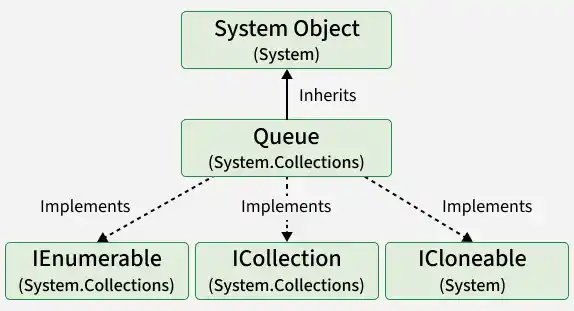
The Queue class inherits from System.Object and implements collection-related interfaces such as ICollection, IEnumerable, and ICloneable. These interfaces provide support for enumeration, collection operations, and shallow copying.
Constructors of Queue
The Queue class provides four constructors to create an empty queue, specify its initial capacity and growth factor, or initialize it from an existing collection.
- Queue(): Creates an empty queue with the default initial capacity.
- Queue(int capacity): Creates an empty queue with a specified initial capacity.
- Queue(int capacity, float growFactor): Creates an empty queue with the specified capacity and growth factor.
- Queue(ICollection collection): The elements are copied in the order provided by the collection's enumerator, preserving their order in the queue.
The growth factor must be between 1.0 and 10.0, inclusive.
Example: The following program demonstrates different ways to initialize a Queue.
using System;
using System.Collections;

public class Geeks {
    public static void Main()
    {
        // Empty Queue
        Queue queue1 = new Queue();

        // Queue with initial capacity
        Queue queue2 = new Queue(5);

        // Queue with capacity and growth factor
        Queue queue3 = new Queue(5, 2.0f);

        // Queue initialized from a collection
        ArrayList numbers = new ArrayList{ 10, 20, 30 };
        Queue queue4 = new Queue(numbers);

        Console.WriteLine("Queue 1 Count: " + queue1.Count);
        Console.WriteLine("Queue 2 Count: " + queue2.Count);
        Console.WriteLine("Queue 3 Count: " + queue3.Count);
        Console.WriteLine("Queue 4 Count: " + queue4.Count);
    }
}
Output
Queue 1 Count: 0
Queue 2 Count: 0
Queue 3 Count: 0
Queue 4 Count: 3
Explanation: The first three constructors create empty queues, while the fourth initializes a queue with three elements from an existing ArrayList. Specifying capacity does not add elements to a queue.
Properties of Queue
The Queue class provides properties to retrieve information about its elements and synchronization status.
Property | Description |
|---|---|
Gets the number of elements currently stored in the queue. | |
Indicates whether access to the queue is synchronized. | |
Gets an object that can be used to synchronize access to the queue. |
Although the non-generic Queue class does not expose a public Capacity property, it manages its internal storage capacity automatically. The capacity increases when additional space is required and can be reduced using the TrimToSize() method.
Example: The following program demonstrates the properties of the Queue class.
using System;
using System.Collections;

class Geeks{

    public static void Main(){

        Queue queue = new Queue();

        queue.Enqueue("Apple");
        queue.Enqueue("Banana");
        queue.Enqueue("Mango");

        Console.WriteLine("Count: " + queue.Count);
        Console.WriteLine("IsSynchronized: " + queue.IsSynchronized);
        Console.WriteLine("SyncRoot is null: " + (queue.SyncRoot == null));
    }
}
Output
Count: 3
IsSynchronized: False
SyncRoot is null: False
Explanation: Count returns the total elements, IsSynchronized indicates that the queue is not synchronized, and SyncRoot provides an object that can be used for locking.
Performing Different Operations on Queue
The Queue class supports operations for adding, accessing, removing, searching, and counting elements. These operations preserve FIFO ordering.
1. Adding Elements Using Enqueue()
The Enqueue() method inserts an element at the rear of the queue. Elements are processed in the order they are added.
using System;
using System.Collections;

class Geeks{
    public static void Main(){
        Queue queue = new Queue();

        queue.Enqueue("Geeks");
        queue.Enqueue("For");
        queue.Enqueue("Geeks");

        foreach (object item in queue)
        {
            Console.WriteLine(item);
        }
    }
}
Output
Geeks
For
Geeks
Explanation: Elements are inserted at the rear. When the queue is enumerated, they appear in FIFO order.
2. Accessing the Front Element Using Peek()
The Peek() method returns the first element of the queue without removing it. The queue remains unchanged.
using System;
using System.Collections;

class Geeks{
    public static void Main(){
        Queue queue = new Queue();

        queue.Enqueue(10);
        queue.Enqueue(20);
        queue.Enqueue(30);

        Console.WriteLine("Front element: " + queue.Peek());
        Console.WriteLine("Count: " + queue.Count);
    }
}
Output
Front element: 10
Count: 3
Explanation: Peek() returns 10 because it was added first. The count remains three because no element is removed.
3. Removing Elements Using Dequeue()
The Dequeue() method removes and returns the element at the front of the queue. The next element becomes the new front.
using System;
using System.Collections;

class Geeks{
    public static void Main(){
        Queue queue = new Queue();

        queue.Enqueue(10);
        queue.Enqueue(20);
        queue.Enqueue(30);

        Console.WriteLine("Removed: " + queue.Dequeue());
        Console.WriteLine("New front: " + queue.Peek());
        Console.WriteLine("Count: " + queue.Count);
    }
}
Output
Removed: 10
New front: 20
Count: 2
Explanation: Dequeue() removes 10, the first inserted element. The new front becomes 20, and the number of elements decreases to two.
4. Checking the Number of Elements Using Count
The Count property returns the number of elements currently stored in the queue. It can also be used to check whether the queue is empty.
using System;
using System.Collections;

class Geeks{
    public static void Main(){
        Queue queue = new Queue();

        queue.Enqueue(10);
        queue.Enqueue(20);
        queue.Enqueue(30);

        Console.WriteLine("Total elements: " + queue.Count);
        Console.WriteLine("Is empty: "
                          + (queue.Count == 0));
    }
}
Output
Total elements: 3
Is empty: False
Explanation: Count returns 3 because the queue contains three elements. The expression queue.Count == 0 returns False.
5. Removing All Elements Using Clear()
The Clear() method removes all elements from the queue. After calling it, the queue becomes empty and its Count becomes zero.
using System;
using System.Collections;

class Geeks{
    public static void Main(){
        Queue queue = new Queue();

        queue.Enqueue(10);
        queue.Enqueue(20);
        queue.Enqueue(30);

        Console.WriteLine("Before Clear: " + queue.Count);

        queue.Clear();

        Console.WriteLine("After Clear: " + queue.Count);
    }
}
Output
Before Clear: 3
After Clear: 0
Explanation: Clear() removes all three elements. The queue can be reused by adding new elements.
6. Checking an Element Using Contains()
The Contains() method determines whether a specified element exists in the queue. It returns true if the element is present and false otherwise.
using System;
using System.Collections;

class Geeks{
    public static void Main(){
        Queue queue = new Queue();

        queue.Enqueue("Apple");
        queue.Enqueue("Banana");
        queue.Enqueue("Mango");

        Console.WriteLine(queue.Contains("Banana"));
        Console.WriteLine(queue.Contains("Orange"));
    }
}
Output
True
False
Explanation: Contains() returns True for "Banana" because it exists in the queue and False for "Orange" because it does not.
Important: Calling
Peek()orDequeue()on an empty non-genericQueuethrows anInvalidOperationException. CheckCount > 0before using these methods when the queue may be empty.
Applications of Queue
The Queue class is useful when elements must be processed in the same order in which they are received.
- Task Scheduling: Processes queued tasks sequentially.
- Print Queue: Manages print jobs in their arrival order.
- Breadth-First Search (BFS): Stores vertices for level-by-level graph traversal.
- Request Processing: Handles requests in arrival order when FIFO processing is required.
- Data Buffering: Temporarily stores incoming data until it can be processed.
Generic vs Non-Generic Queue
C# provides both Queue and Queue<T>. Although both follow FIFO, they differ in type safety and usage.
Non-Generic | Generic |
|---|---|
Belongs to | Belongs to |
Stores elements as | Stores elements of a specified type. |
Allows mixing different data types. | Enforces compile-time type safety. |
May require explicit casting. | Usually avoids casting. |
May involve boxing and unboxing for value types. | Avoids unnecessary boxing for value types. |
Methods of Queue
The important methods of the Queue class are:
Method | Description |
|---|---|
Adds an element to the rear of the queue. | |
Removes and returns the element at the front of the queue. | |
Returns the front element without removing it. | |
Checks whether the specified element exists in the queue. | |
Removes all elements from the queue. | |
Creates a shallow copy of the queue. | |
Copies queue elements into an existing one-dimensional array, starting at the specified index. | |
Returns an enumerator for iterating through the queue. | |
Copies the queue elements into a new array in FIFO order. | |
Adjusts the internal capacity to match the number of elements. | |
Returns a synchronized wrapper around the specified queue. |
