

An array is a collection of elements of the same data type stored in a sequence of memory locations. It allows multiple values to be stored under a single name and accessed using an index.
- Arrays can hold value types (like int, char, bool, etc.) and reference types (like string and objects)
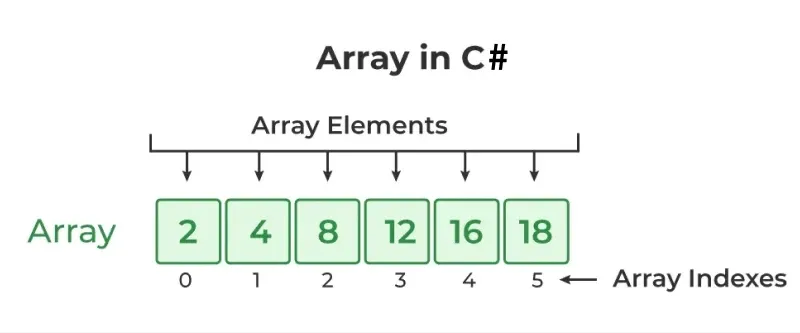
- Array elements are accessed using indexes, starting from 0.
- After creating an array, its size is fixed and cannot be changed.
Example: Program to demonstrates arrays of integers and strings in C#.
using System;

class GFG
{
    static void Main()
    {
        // Value type array
        int[] arr = { 10, 20, 30, 40 };
        int n = arr.Length;

        Console.Write("Value Type Array -> ");
        for (int i = 0; i < n; i++)
            Console.Write(arr[i] + " ");

        Console.WriteLine();

        // Reference type array
        string[] names = { "Lakshit", "Rahul", "Pankaj" };

        Console.Write("Reference Type Array -> ");
        for (int i = 0; i < names.Length; i++)
            Console.Write(names[i] + " ");
    }
}
Output
Value Type Array -> 10 20 30 40
Reference Type Array -> Lakshit Rahul Pankaj
Explanation: The integer array stores numeric values and is traversed using a loop, while the string array stores references to string objects and is printed using its Length property.
The following figure shows how array stores values sequentially:
Declaring an Array
In C#, an array is declared by specifying the data type, followed by square brackets [] and the array name.
dataType[] arrayName;
Example:
int[] arr;
string[] names;
Here,
- dataType: It defines the element type of the array.
- [ ] : Represents that the variable is an array type.
- arrayName: It is the Name of array.
Note : Only Declaration of an array doesn’t allocate memory to the array. For that array must be initialized.
Initializing an Array
Array is a reference type so the new keyword used to create an instance of the array. We can assign initialize individual array elements, with the help of the index.
Syntax:
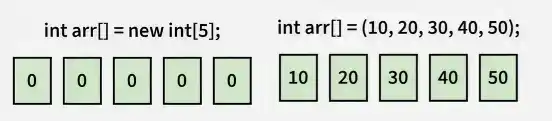
int[] arr = new int[size];
Once created, an array has a fixed size and is allocated on the managed heap with elements automatically initialized to default values such as 0, false, or null, while List<T> can be used for dynamically sized collections.
Initialization Using Array Literal
An array can be initialized when it is declared by specifying its elements inside curly braces {}. The new keyword is not required in this case.
Examples:
int[] arr = { 1, 2, 3 };
The number of elements determines the length of the created array, and C# allows array initializer syntax without explicitly writing new int[] when the array is declared and initialized in the same statement.
Types of Arrays
C# supports three main types of arrays based on how elements are organized and stored:
1. One-Dimensional Array
A one-dimensional array stores elements in a single sequence. Each element is accessed using a single index, starting from 0.
Syntax:
dataType[] arrayName = new dataType[size];
Example: Program to demonstrate, storing and displaying five integers in an array.
using System;
    class GFG {
        static void Main()
        {
            int[] arr = { 10, 20, 30, 40, 50 };
            foreach(int i in arr)
            {
                Console.Write(i + " ");
            }
        }
    }
Output
10 20 30 40 50
Here, the array stores five integers, which are accessed and printed using a foreach loop.
2. Multidimensional Array
A multidimensional array stores elements in multiple dimensions, such as rows and columns. In C#, rectangular arrays can be two-dimensional or have more dimensions. All rows in a two-dimensional rectangular array have the same number of columns.
Syntax:
dataType[,] arrayName = new dataType[rows, columns];
Example: Program to demonstrate, accessing elements using row and column indexes
using System;
class GFG {
    static void Main()
    {
        int[, ] arr = { { 10, 20 }, { 30, 40 } };
        Console.WriteLine(arr[0, 1]);
        Console.WriteLine(arr[1, 0]);
    }
}
Output
20
30
Here, the two-dimensional array contains two rows and two columns. Elements are accessed using two indexes, representing the row and column.
3. Jagged Array
A jagged array is an array of arrays in which each inner array can have a different number of elements. Unlike a rectangular multidimensional array, its rows do not need to have the same length.
Syntax:
dataType[][] arrayName = new dataType[rows][];
Example: Program to demonstrate, storing different numbers of elements in each inner array.
using System;
class GFG {
    static void Main()
    {
        int[][] arr = new int[3][];
        arr[0] = new int[] { 10, 20 };
        arr[1] = new int[] { 30, 40, 50 };
        arr[2] = new int[] { 60 };
        for (int i = 0; i < arr.Length; i++) {
            foreach(int value in arr[i])
            {
                Console.Write(value + " ");
            }
            Console.WriteLine();
        }
    }
}
Output
10 20
30 40 50
60
Here, each inner array has a different length. Jagged arrays are useful when each row needs to store a different number of elements.
For more information click here, Jagged Arrays in C#
Operations on Array Elements
1. Access Array Elements
Elements of an array can be accessed using their position, called the index. In C#, array indexing starts from 0. To access an element, specify its index inside square brackets [] along with the array name.
using System;

class GFG
{
    static void Main()
    {
        int[] arr = { 2, 4, 8, 12, 16 };

        // Accessing the fourth element
        Console.Write(arr[3] + " ");

        // Accessing the first element
        Console.Write(arr[0]);
    }
}
Output
12 2
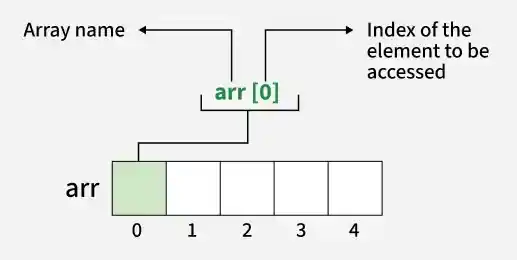
Note: An index cannot be negative or greater than or equal to the array's length. For an array of size n, valid indexes range from 0 to n - 1. The index can also be an expression that evaluates to a valid index.
2. Update Array Elements
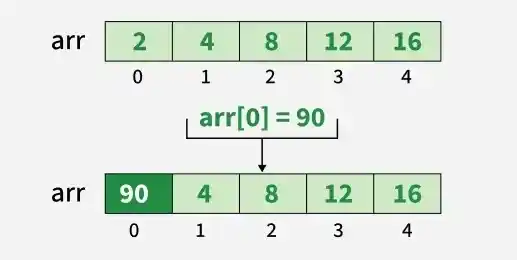
To update an element at a specific index, use the assignment operator = to assign a new value to that element.
using System;

class GFG
{
    static void Main()
    {
        int[] arr = { 2, 4, 8, 12, 16 };

        // Updating the first element
        arr[0] = 90;

        Console.WriteLine(arr[0]);
    }
}
Output
90
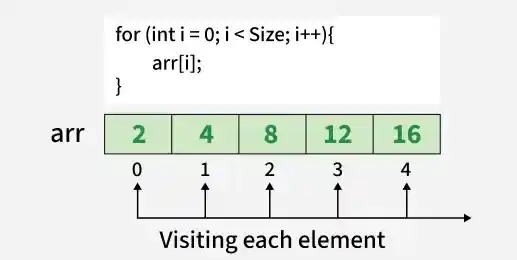
3. Traverse Array
Traversing an array means accessing each element one by one. In C#, an array can be traversed using a loop that runs from 0 to arr.Length - 1.
using System;

class GFG
{
    static void Main()
    {
        int[] arr = { 2, 4, 8, 12, 16 };

        // Traversing and printing the array
        for (int i = 0; i < arr.Length; i++)
        {
            Console.Write(arr[i] + " ");
        }
    }
}
Output
2 4 8 12 16
4. Size of Array
The size of an array refers to the number of elements it can hold. In C#, the built-in Length property is used to find the number of elements in an array.
using System;

class GFG
{
    static void Main()
    {
        int[] arr = { 2, 4, 8, 12, 16 };

        Console.WriteLine("Size of array: " + arr.Length);
    }
}
Output
Size of array: 5
Arrays of Objects
An array of objects stores references to objects of a class. Each element can refer to an object created using the new keyword.
Example: Create an array of five Student objects by instantiating each student using its constructor and storing the references in the array.
using System;

class Student
{
    public int roll_no;
    public string name;

    public Student(int roll_no, string name)
    {
        this.roll_no = roll_no;
        this.name = name;
    }
}

class GFG
{
    static void Main()
    {
        // Declaring an array of Student objects
        Student[] arr;

        // Allocating memory for five Student references
        arr = new Student[5];

        // Initializing the array elements
        arr[0] = new Student(1, "aman");
        arr[1] = new Student(2, "vaibhav");
        arr[2] = new Student(3, "shikar");
        arr[3] = new Student(4, "dharmesh");
        arr[4] = new Student(5, "mohit");

        // Accessing the array elements
        for (int i = 0; i < arr.Length; i++)
        {
            Console.WriteLine(
                "Element at " + i + " : { " +
                arr[i].roll_no + " " +
                arr[i].name + " }");
        }
    }
}
Output
Element at 0 : { 1 aman }
Element at 1 : { 2 vaibhav }
Element at 2 : { 3 shikar }
Element at 3 : { 4 dharmesh }
Element at 4 : { 5 mohit }
What Happens If We Try to Access Elements Outside the Array Size?
C# throws an IndexOutOfRangeException when an array is accessed using an invalid index. The index may be negative or greater than or equal to the array's length.
using System;

class Program
{
    static void Main()
    {
        int[] arr = new int[4];

        arr[0] = 10;
        arr[1] = 20;
        arr[2] = 30;
        arr[3] = 40;

        Console.WriteLine(
            "Trying to access element outside the size of array");

        Console.WriteLine(arr[5]);
    }
}
Output
Abort signal from abort(3) (SIGABRT)
Unhandled exception. System.IndexOutOfRangeException: Index was outside the bounds of the array.
at Program.Main()
Passing Arrays to Methods
Like variables, arrays can also be passed to methods. For example, the following program passes an array to the Sum() method to calculate the sum of its elements.
using System;

class GFG
{
    static void Main()
    {
        int[] arr = { 3, 1, 2, 5, 4 };

        // Passing the array to the Sum method
        Sum(arr);
    }

    static void Sum(int[] arr)
    {
        // Calculating the sum of array values
        int sum = 0;

        for (int i = 0; i < arr.Length; i++)
            sum += arr[i];

        Console.WriteLine("Sum of array values: " + sum);
    }
}
Output
Sum of array values: 15
Explanation
- This program demonstrates how to pass an array to a method.
- An integer array arr is declared and initialized in the Main() method
- The Sum() method is called with arr as an argument.
- Inside the Sum() method, all array elements are added using a for loop.
- The final sum is printed to the console.
Returning Arrays from Methods
A method in C# can also return an array. The return type specifies the element type followed by square brackets [].
using System;

class GFG
{
    static void Main()
    {
        int[] arr = GetArray();

        for (int i = 0; i < arr.Length; i++)
            Console.Write(arr[i] + " ");
    }

    static int[] GetArray()
    {
        // Returning an array
        return new int[] { 1, 2, 3 };
    }
}
Output
1 2 3
Advantages
- Efficient Access: Accessing an element by its index is fast, with constant time complexity, O(1)O(1)O(1).
- Memory Management: Arrays have a fixed size, which makes their capacity predictable.
- Data Organization: Arrays help organize related elements in a structured manner.
Limitations
- Fixed Size: The size of an array cannot be changed after creation. Use List<T> when dynamic resizing is required.
- Type Homogeneity: An array normally stores elements of one declared type. Use object[] or suitable collections when working with different types.
- Costly Insertion and Deletion: Inserting or removing elements in the middle of an array may require shifting elements. Collections such as List<T> can provide more convenient operations depending on the use case.
