

C# data types define the type of data that a variable can store. They help the compiler determine storage requirements, check type compatibility, and ensure type safety. C# supports different data types for storing numbers, characters, Boolean values, and objects.
- Determines the amount of memory required to store a value.
- Prevents incompatible values from being assigned to variables without appropriate conversion.
- Defines the operations that can be performed on values of a particular data type.
Syntax
dataType variableName = value;
using System;

class Geeks{
    static void Main()
    {
        int number = 10;
        Console.WriteLine(number);
    }
}
Output
10
In the above example, int specifies that the variable number stores a 32-bit integer value.
Types of Data Types
C# data types are mainly divided into three categories:
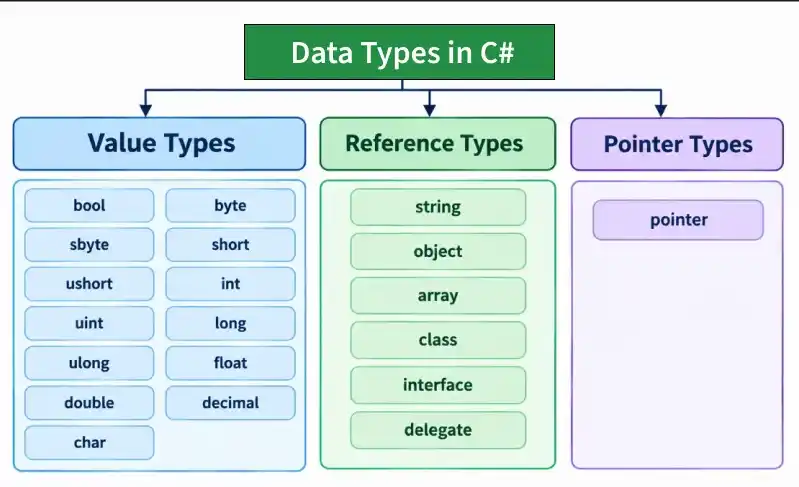
Value Data Types
Value data types store their data directly. When a value-type variable is assigned to another variable, its value is copied. Therefore, modifying one variable does not affect the other.
C# provides several built-in value types, including integer, floating-point, decimal, character, and Boolean types.
1. bool Data Type
The bool data type stores one of two logical values: true or false. It is commonly used in conditional statements and decision-making operations.
Syntax:
bool variableName;
using System;

class Geeks{
    static void Main()
    {
        bool isCSharpEasy = true;
        bool isCompleted = false;

        Console.WriteLine("Is C# Easy? " + isCSharpEasy);
        Console.WriteLine("Is Completed? " + isCompleted);
    }
}
Output
Is C# Easy? True
Is Completed? False
Explanation: The variables isCSharpEasy and isCompleted store Boolean values. The Console.WriteLine() method displays these values.
2. byte Data Type
The byte data type is an unsigned 8-bit integer that stores values from 0 to 255. It is useful when working with binary data, image processing, or values that do not require negative numbers.
Syntax:
byte variableName;
using System;

class Geeks{
    static void Main()
    {
        byte age = 25;
        byte marks = 95;

        Console.WriteLine("Age: " + age);
        Console.WriteLine("Marks: " + marks);
    }
}
Output
Age: 25
Marks: 95
Explanation: The variables age and marks store unsigned integer values within the range of the byte data type.
3. sbyte Data Type
The sbyte data type is a signed 8-bit integer that stores values from -128 to 127. Unlike byte, it supports both positive and negative values.
Syntax:
sbyte variableName;
using System;

class Geeks{
    static void Main(){
        sbyte temperature = -20;
        sbyte value = 100;

        Console.WriteLine("Temperature: " + temperature);
        Console.WriteLine("Value: " + value);
    }
}
Output
Temperature: -20
Value: 100
Explanation: The sbyte data type allows both negative and positive integer values within its supported range.
4. short Data Type
The short data type is a signed 16-bit integer used to store whole numbers ranging from -32,768 to 32,767.
Syntax:
short variableName;
using System;

class Geeks{
    static void Main()
    {
        short students = 1500;
        short temperature = -200;

        Console.WriteLine("Students: " + students);
        Console.WriteLine("Temperature: " + temperature);
    }
}
Output
Students: 1500
Temperature: -200
Explanation: The variables students and temperature store integer values within the supported range of short.
5. ushort Data Type
The ushort data type is an unsigned 16-bit integer that stores values from 0 to 65,535. It is useful when negative values are not required.
Syntax:
ushort variableName;
using System;

class Geeks{
    static void Main()
    {
        ushort distance = 50000;
        ushort quantity = 2500;

        Console.WriteLine("Distance: " + distance);
        Console.WriteLine("Quantity: " + quantity);
    }
}
Output
Distance: 50000
Quantity: 2500
Explanation: Both variables store non-negative integer values within the range supported by ushort.
6. int Data Type
The int data type is a signed 32-bit integer and one of the most commonly used numeric data types in C#. It stores whole numbers ranging from -2,147,483,648 to 2,147,483,647.
Syntax:
int variableName;
using System;

class Geeks{
    static void Main()
    {
        int population = 2000000;
        int distance = 150000;

        Console.WriteLine("Population: " + population);
        Console.WriteLine("Distance: " + distance);
    }
}
Output
Population: 2000000
Distance: 150000
Explanation: The int data type stores whole numbers without decimal values.
7. uint Data Type
The uint data type is an unsigned 32-bit integer that stores non-negative values ranging from 0 to 4,294,967,295.
Syntax:
uint variableName;
using System;

class Geeks{
    static void Main()
    {
        uint population = 3000000000U;
        uint totalUsers = 500000U;

        Console.WriteLine("Population: " + population);
        Console.WriteLine("Total Users: " + totalUsers);
    }
}
Output
Population: 3000000000
Total Users: 500000
Explanation: The U suffix indicates an unsigned integer literal. The uint type is suitable for non-negative integer values within its range.
8. long Data Type
The long data type is a signed 64-bit integer used to store large whole numbers that exceed the range of int.
Syntax:
long variableName;
using System;

class Geeks{
    static void Main()
    {
        long worldPopulation = 7800000000L;
        long distance = 9460730472580800L;

        Console.WriteLine("World Population: " + worldPopulation);
        Console.WriteLine("Distance: " + distance);
    }
}
Output
World Population: 7800000000
Distance: 9460730472580800
Explanation: The L suffix indicates a long integer literal. It is useful when working with large integer values.
9. ulong Data Type
The ulong data type is an unsigned 64-bit integer used to store large non-negative integer values.
Syntax:
ulong variableName;
using System;

class Geeks{
    static void Main()
    {
        ulong largeNumber = 18000000000000000000UL;

        Console.WriteLine("Large Number: " + largeNumber);
    }
}
Output
Large Number: 18000000000000000000
Explanation: The UL suffix identifies an unsigned long integer literal.
10. float Data Type
The float data type is a 32-bit single-precision floating-point type used to store fractional numbers. It provides approximately 6–9 significant decimal digits of precision.
Syntax:
float variableName;
using System;

class Geeks{
    static void Main()
    {
        float pi = 3.14f;
        float gravity = 9.81f;

        Console.WriteLine("Pi: " + pi);
        Console.WriteLine("Gravity: " + gravity);
    }
}
Output
Pi: 3.14
Gravity: 9.81
Explanation: The f suffix specifies that the numeric literal is of type float.
11. double Data Type
The double data type is a 64-bit double-precision floating-point type. It provides approximately 15–17 significant decimal digits of precision and is the default type for floating-point literals in C#.
Syntax:
double variableName;
using System;

class Geeks{
    static void Main()
    {
        double pi = 3.141592653589793;
        double gravity = 9.80665;

        Console.WriteLine("Pi: " + pi);
        Console.WriteLine("Gravity: " + gravity);
    }
}
Output
Pi: 3.141592653589793
Gravity: 9.80665
Explanation: The double data type provides higher precision than float, making it useful for scientific and mathematical calculations.
Note: Both float and double use binary floating-point representation, which may introduce rounding errors in decimal calculations.
12. decimal Data Type
The decimal data type is a 128-bit decimal type that provides approximately 28–29 significant decimal digits of precision. It is commonly used for financial and monetary calculations.
Syntax:
decimal variableName;
using System;

class Geeks{
    static void Main()
    {
        decimal price = 999.99m;
        decimal tax = 18.50m;

        Console.WriteLine("Price: " + price);
        Console.WriteLine("Tax: " + tax);
    }
}
Output
Price: 999.99
Tax: 18.50
Explanation: The m suffix specifies a decimal literal. Unlike binary floating-point types, decimal can represent many common decimal fractions exactly.
13. char Data Type
The char data type stores a single UTF-16 code unit. It is commonly used to represent individual characters such as letters, digits, or symbols.
Syntax:
char variableName;
using System;

class Geeks{
    static void Main()
    {
        char grade = 'A';
        char symbol = '$';

        Console.WriteLine("Grade: " + grade);
        Console.WriteLine("Symbol: " + symbol);
    }
}
Output
Grade: A
Symbol: $
Explanation: Character values are enclosed in single quotation marks. Each variable stores one UTF-16 code unit.
Note: Some Unicode characters, such as many emoji, require two UTF-16 code units and therefore cannot be represented by a single char.
Reference Data Types
Reference data types store references to objects. Multiple reference variables can refer to the same object in memory.When two variables reference the same mutable object, changes made through one variable can be observed through the other.
1. string Data Type
The string data type stores a sequence of UTF-16 code units representing text. Strings are immutable, meaning their contents cannot be modified after creation.
Syntax:
string variableName = "value";
using System;

class Geeks{
    static void Main()
    {
        string name = "Geeks";
        string message = "Welcome to C#";

        Console.WriteLine("Name: " + name);
        Console.WriteLine("Message: " + message);
    }
}
Output
Name: Geeks
Message: Welcome to C#
Explanation: The variables name and message reference string objects containing text.
Note: Strings cannot be modified after creation. Operations that appear to modify a string produce a new string value. For repeated modifications, StringBuilder can be more efficient.
2. object Data Type
The object type is the base type of all C# types. It can hold references to objects of any reference type, as well as boxed values of value types.
Syntax:
object variableName = value;
using System;

class Geeks{
    static void Main()
    {
        object number = 100;
        object message = "Hello C#";

        Console.WriteLine("Number: " + number);
        Console.WriteLine("Message: " + message);
    }
}
Output
Number: 100
Message: Hello C#
Explanation: The number variable contains a boxed integer, while message references a string object. The process of converting a value type into an object representation is called boxing.
3. Array
An array stores a fixed number of elements of a specified type. Arrays are reference types in C#, even when their elements are value types. Array indexing starts from 0.
Syntax:
dataType[] arrayName = { value1, value2, value3 };
using System;

class Geeks{
    static void Main()
    {
        int[] numbers = { 10, 20, 30, 40, 50 };
        string[] names = { "Geek1", "Geek2", "Geek3" };

        Console.WriteLine("First Number: " + numbers[0]);
        Console.WriteLine("Second Name: " + names[1]);
    }
}
Output
First Number: 10
Second Name: Geek2
Explanation: The numbers array stores integers, while the names array stores string references. Elements are accessed using their indexes.
3. Class
A class is a user-defined reference type that defines the fields, properties, and methods of an object. It is a fundamental building block of object-oriented programming in C#.
Syntax:
class ClassName{
// Members
}
using System;

class Car{
    public string Model;
    public int Year;

    public Car(string model, int year)
    {
        Model = model;
        Year = year;
    }

    public void Display()
    {
        Console.WriteLine(Model + " " + Year);
    }
}

class Geeks{
    static void Main()
    {
        Car myCar = new Car("Toyota", 2020);
        myCar.Display();
    }
}
Output
Toyota 2020
Explanation: The Car class defines two fields and a constructor. The myCar variable references an instance of the class, and the Display() method prints its details.
6. Delegate
A delegate is a reference type that represents references to methods with compatible signatures. Delegates are commonly used in event handling, callbacks, and functional programming.
Syntax:
delegate void DelegateName();
using System;

class Geeks{
    delegate void Message();

    static void Display()
    {
        Console.WriteLine("Hello from Delegate");
    }

    static void Main()
    {
        Message msg = Display;
        msg();
    }
}
Output
Hello from Delegate
Explanation: The Message delegate references the Display() method. Calling msg() invokes that method.
Pointer Data Type
Pointer data types store memory addresses. They are used in advanced programming scenarios where direct memory access is required. Unlike ordinary reference types, pointers can perform operations involving memory addresses. Pointer operations generally require an unsafe context.
Syntax:
dataType* pointerName;
using System;

class Geeks{
    static unsafe void Main()
    {
        int number = 10;
        int* ptr = &number;

        Console.WriteLine("Value: " + number);
        Console.WriteLine("Pointer Value: " + *ptr);
    }
}
Output:
Value: 10
Pointer Value: 10
Explanation:
- int* ptr declares a pointer to an integer.
- &number obtains the memory address of the variable.
- *ptr dereferences the pointer to access the stored value.
Note: Pointer operations require unsafe code to be enabled during compilation. For example, unsafe compilation can be enabled using the /unsafe compiler option or by setting <AllowUnsafeBlocks>true</AllowUnsafeBlocks> in the project file.
Advantages of C# Data Types
C# data types provide several advantages when developing applications:
- Type Safety: Help detect invalid assignments and incompatible operations during compilation.
- Memory Management: Provide predictable sizes for built-in numeric types.
- Code Readability: Make the intended purpose of variables easier to understand.
- Data Accuracy: Offer multiple numeric types with different ranges and precision.
- Performance: Allow programmers to select appropriate types based on application requirements.
- Object-Oriented Programming: Support classes, interfaces, and other reference types.
- Error Prevention: Help identify many type-related errors before program execution.
