

Methods are blocks of code that perform a specific task. A method allows us to reuse code, improving both efficiency and organization. Methods in C# are declared inside classes, structs, or interfaces. Methods are similar to functions and are used to define the behavior of objects.
- A method allows us to write a piece of logic once and reuse it wherever needed in the program.
- It helps to keep your code clean, organized, easier to understand, and manage.
using System;

public class Geeks
{
    // An example method
    public void PrintMessage()
    {
        Console.WriteLine("Hello, Geeks!");
    }

    public static void Main()
    {
        // Create an instance of the class
        // containing the method
        Geeks obj = new Geeks();

        // Calling the method
        obj.PrintMessage();
    }
}
Output
Hello, Geeks!Explanation
- Here, first we create a method which prints
Hello, Geeks!. PrintMessage()is a simple method that prints a message.- It has no parameters and does not return anything.
Syntax
returnType MethodName(parameters) {
// method body
return value; // optional (only if returnType is not void)
}
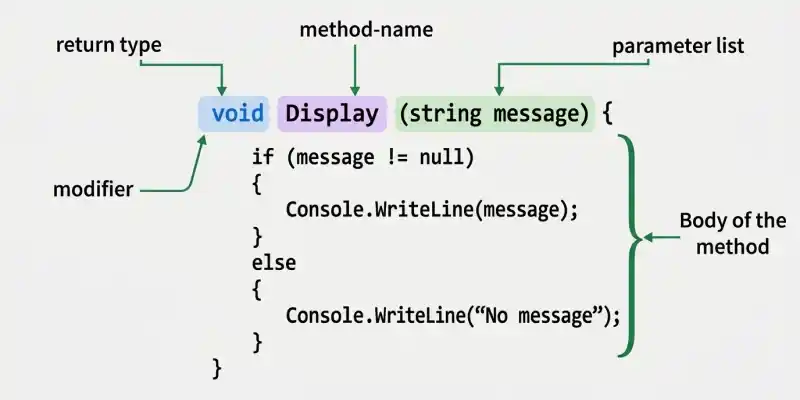
Key Components of a Method Declaration
- Modifier: Defines the access level such as public, private, protected, or internal.
- Return Type: Specifies what value the method returns or void if it does not return anything.
- Method Name: Name of the method. C# convention generally uses PascalCase for method names.
- Parameters: Optional inputs passed to the method.
- Method Body: Contains the logic or statements to be executed.
Why Use Methods?
Breaking code into separate methods helps improve readability, reusability, and maintainability.
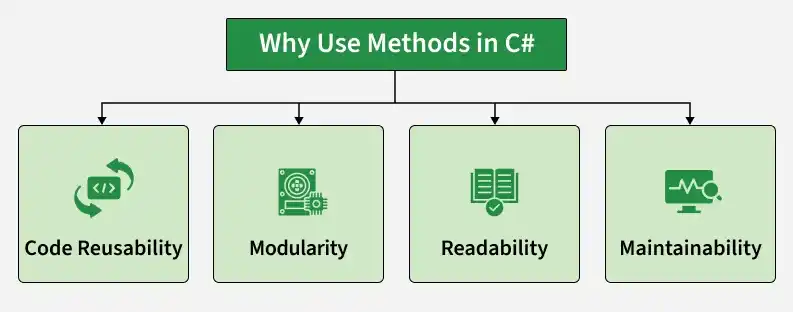
- Code Reusability: Write once and use multiple times without repeating code.
- Modularity: Dividing a program into separate methods allows each method to handle a specific task, making the code more organized and easier to manage.
- Readability: Smaller, named methods make the code easier to read and understand.
- Maintainability: It is easier to fix bugs or update code when it is organized into methods.
Method Call Stack
The call stack is a runtime structure used by the .NET runtime to manage method calls. It follows the Last-In-First-Out (LIFO) principle, where the most recently called method completes first. When a method is called:
- A stack frame is created for the method call.
- The method executes its statements.
- When the method finishes, its stack frame is removed and control returns to the calling method.
Methods Execution
When a method is called:
- A new stack frame is added to the call stack to store method details.
- The method runs its code.
- After execution, the stack frame is removed, and control goes back to the calling method.
C# applications use the .NET runtime to manage method execution and the call stack. Let's use an image to understand how the method call stack works.
Example: Let's understand how the above image works with the help of a C# code example
using System;

public class CallStackExample{
    public static void D(){

        float d = 40.5f;
        Console.WriteLine("In Method D: " + d);
    }

    public static void C(){

        double c = 30.5;
        Console.WriteLine("In Method C: " + c);
    }

    public static void B(){

        int b = 20;
        C(); // Calling C
        Console.WriteLine("In Method B: " + b);
    }

    public static void A(){

        int a = 10;
        B(); // Calling B
        Console.WriteLine("In Method A: " + a);
    }

    public static void Main(string[] args){

        A(); // Start with method A
        D(); // Then call D
    }
}
Output
In Method C: 30.5
In Method B: 20
In Method A: 10
In Method D: 40.5
Types of Methods
1. Predefined Methods
Predefined methods are methods that are already defined in the .NET class libraries. They are also known as standard library methods or built-in methods.
For example, Math.Sqrt() is a predefined method available in the Math class.
Math.Sqrt(25); // Returns the square root of 25
Math.Abs(-10); // Returns the absolute value of -10
2. User-defined Methods
The methods written by the user or programmer are known as user-defined methods. These methods can be created and modified according to the requirements of the program.
Example:
PrintMessage(); // User-defined method
Greet();
SetName();
Different Ways to Create Methods
There are two common ways to create methods in C#:
1. Instance Method
Instance methods are declared inside a class and are called using an object of that class. They can access instance members of the class.
Syntax
// Instance Method
void MethodName()
{
// instance method body
}
using System;

class Geeks
{
    void Hello()
    {
        Console.WriteLine("Hello");
    }

    static void Main()
    {
        Geeks obj = new Geeks();
        obj.Hello();
    }
}
Output
Hello2. Static Method
Static methods belong to the type rather than to a particular object. They are declared using the static keyword and can be called using the class name.
Syntax
// Static Method
static void MethodName()
{
// static method body
}
using System;

class GFG
{
    static void Hello()
    {
        Console.WriteLine("Hello");
    }

    static void Main()
    {
        GFG.Hello();
    }
}
Output
HelloMethod Signature
In C#, a method signature consists of the method name and its parameter list.
The parameter list includes:
- Number of parameters
- Type of parameters
- Order of parameters
Note: The return type is not considered part of the method signature.
For example:
Max(int x, int y)
Here:
- Number of parameters = 2
- Type of parameters = int
- Order of parameters = int, int
Naming a Method
In C#, method names generally follow PascalCase naming convention. A method name should usually describe the action performed by the method.
Rules to Name a Method
- Method names should generally start with an uppercase letter.
- Multi-word method names should follow PascalCase format.
- Method names should clearly describe the purpose or action of the method.
- Methods can have the same name when method overloading is used with different parameter lists.
Calling Different Types of Methods
Method calling in C# means invoking a method to execute the code it contains. It transfers control to the method, runs its logic, and then returns to the calling point after execution.
1. Calling a User-Defined Method
User-defined methods are blocks of code written by the programmer. To execute an instance method, we create an object of the class and then call the method using that object.
using System;

class GFG {
    void Hello(){

        Console.WriteLine("This is a user-defined method.");
    }

    static void Main(){

        GFG obj = new GFG(); // Create object
        obj.Hello(); // Call method
    }
}
Output
This is a user-defined method.Explanation
In the above code, a class Geeks contains a method Hello() that displays a message. In the Main() method, we create an object of the class and use it to call the Hello() method.
2. Calling an Abstract Method
Abstract methods have no implementation in the abstract class and must be overridden in a derived class. They are called using an object of the derived class.
Example
using System;

abstract class GeeksHelp{

    public abstract void Check(string name);
}

class Geeks : GeeksHelp{

    public override void Check(string name){

        Console.WriteLine(name);
    }

    static void Main(){

        // Derived class object
        Geeks obj = new Geeks();
        obj.Check("GeeksforGeeks");
    }
}
Output
GeeksforGeeksExplanation
In the above code, an abstract class GeeksHelp contains an abstract method Check(). The method is implemented in the derived class Geeks. In the Main() method, an object of Geeks is created to call the implemented Check() method.
3. Calling the Predefined Methods
C# provides many built-in methods through the .NET class libraries, such as GetHashCode().
Example
using System;

public class Geeks{

    public static void Main(){

        Geeks obj = new Geeks();

        Console.WriteLine(obj.GetHashCode());
    }
}
Output
58225482Explanation: In the above code, an object of the Geeks class is created and the predefined GetHashCode() method is called.
GetHashCode() returns an integer hash code for the object. It is commonly used by hash-based collections such as Dictionary<TKey, TValue> and HashSet<T>. The value is not guaranteed to be unique or represent a memory address.
4. Calling a Static Method
Static methods belong to the class rather than to an object. They can be called without creating an instance of the class.
using System;

class Test{
    public static void Hello(){
        Console.WriteLine("Hello");
    }
}

class Geeks {
    static void Main(){

        // Call static method directly
        Test.Hello();
    }
}
Output
HelloExplanation
We call the static method Hello() from the Test class without creating an instance of the class. The method prints "Hello" when invoked from the Main() method.
