

A property is a member of a class that provides a flexible way to read, write, or compute the value of a field. It uses accessors to control how a value is accessed or modified.
- Properties are defined using get and set accessors to read and assign values.
- Properties support encapsulation by allowing validation and controlled access to private fields.
Example: Program to demonstrates how a property validates a value before assigning it to a private field.
using System;

class Student
{
    private int age;

    public int Age
    {
        get { return age; }
        set
        {
            if (value >= 0)
                age = value;
            else
                Console.WriteLine("Age cannot be negative!");
        }
    }
}

class GFG
{
    static void Main()
    {
        Student s = new Student();

        s.Age = 24;
        Console.WriteLine("Age: " + s.Age);

        s.Age = -5;
    }
}
Output
Age: 24
Age cannot be negative!
Explanation: The Age property uses get to return the value and set to validate the assigned value before updating the private field.
Syntax
<access_modifier> <data_type> <PropertyName>{
get { /* Return value */ }
set { /* Assign value */ }
}
There are two main reasons to use properties:
- To provide controlled access to private data members, including validation and additional logic.
- To protect class data from invalid or unauthorized modifications.
Accessors
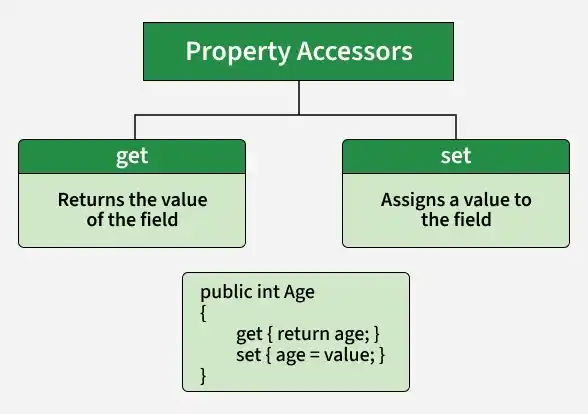
Accessors are the get and set blocks defined inside a property. They control how property values are retrieved and assigned.
- Get accessor: Returns the value of a property.
- Set accessor: Assigns a value to a property using the implicit value parameter.
Example: Program to demonstrates how public fields can be modified directly, while private fields cannot be accessed outside their class.
using System;

public class C1
{
    public int rn;
    public string name;

    private int marks = 35;

    public int GetMarks()
    {
        return marks;
    }
}

public class GFG
{
    public static void Main()
    {
        C1 obj = new C1();

        obj.rn = 10000;
        obj.name = "Rahul";

        Console.WriteLine("Name: {0}\nRoll No: {1}\nMarks: {2}",
                          obj.name, obj.rn, obj.GetMarks());
    }
}
Output
Name: Rahul
Roll No: 10000
Marks: 35
Explanation:
- Public fields (rn and name) can be accessed and modified directly from outside the class.
- The private field (marks) cannot be accessed directly outside the class, so the GetMarks() method is used to retrieve its value.
Syntax
<access_modifier> <data_type> <PropertyName>{
get{
// Return the value
}
set{
// Assign the value
}
}
The main terms used to define properties are:
- Access modifier: Specifies accessibility, such as public, private, protected, or internal.
- Data type: Specifies the type of value the property returns or accepts.
- Get accessor: Retrieves the property value.
- Set accessor: Assigns or modifies the property value.
Get Accessor (Read-Only Property)
A get-only property allows a value to be retrieved without providing a set accessor. It is useful when callers should be able to read a value but not assign it directly through the property.
Example: Program to demonstrates a read-only property.
using System;

class Geeks
{
    private int r = 357;

    // Read-only property
    public int RollNo
    {
        get { return r; }
    }

    public static void Main()
    {
        Geeks obj = new Geeks();

        Console.WriteLine("Roll No: " + obj.RollNo);
    }
}
Output
Roll No: 357
Explanation: The RollNo property contains only a get accessor, allowing the field value to be read but not assigned through that property.
Syntax
public int PropertyName{
get { return fieldName; }
}
Set Accessor (Write-Only Property)
A set-only property allows a value to be assigned without providing a get accessor. The assigned value is available through the implicit value parameter.
Example: Program to demonstrates a property with both get and set accessors.
using System;

public class Geeks
{
    private int r;

    public int RollNo
    {
        get { return r; }
        set { r = value; }
    }

    public Geeks(int rollNo)
    {
        RollNo = rollNo;
    }
}

class GFG
{
    static void Main()
    {
        Geeks obj = new Geeks(147);

        Console.WriteLine("Current Roll No: " + obj.RollNo);

        obj.RollNo = 357;

        Console.WriteLine("Changed Roll No: " + obj.RollNo);
    }
}
Output
Current Roll No: 147
Changed Roll No: 357
Explanation: The RollNo property uses get to retrieve the value and set to update the private field.
Syntax:
public int PropertyName
{
set { fieldName = value; }
}
Note: The example above is a read-write property because it contains both accessors. A property containing only set is a write-only property.Types of Properties
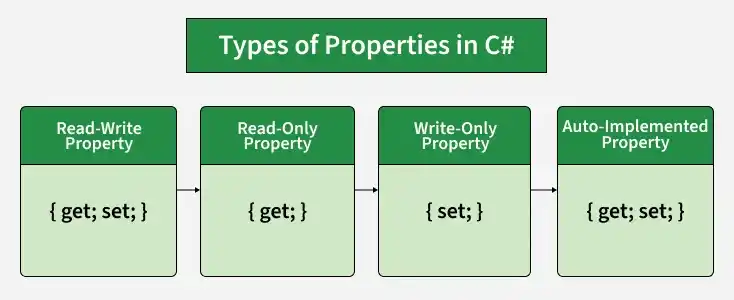
There are four common types of properties:
- Read-Write Properties: Contain both get and set accessors.
- Read-Only Properties: Allow reading but do not provide a set accessor.
- Write-Only Properties: Allow assigning a value but do not provide a get accessor.
- Auto-Implemented Properties: Use { get; set; } without explicitly defining a backing field.
Accessor Accessibility
C# allows access modifiers to be applied to an individual accessor in certain properties to control who can read or modify a value.
- An accessor modifier can be used when a property has both get and set accessors.
- The accessor's accessibility must be more restrictive than the property's accessibility. Accessor modifiers are not allowed in interface declarations or explicit interface implementations
Example: Program to demonstrate a read-write property that allows values to be retrieved and modified.
using System;

public class Student
{
    private int rollNo;

    public int RollNo
    {
        get { return rollNo; }
        set { rollNo = value; }
    }

    public Student(int rollNo)
    {
        this.RollNo = rollNo;
    }
}

class GFG
{
    static void Main()
    {
        Student obj = new Student(147);

        Console.WriteLine($"Roll No: {obj.RollNo}");

        obj.RollNo = 123;

        Console.WriteLine($"Changed Roll No: {obj.RollNo}");
    }
}
Output
Roll No: 147
Changed Roll No: 123
Explanation: The RollNo property allows the program to read and update the private rollNo field.
Example: Program to demonstrate an auto-implemented property without explicitly declaring a backing field.
using System;

public class Student
{
    // Auto-implemented property
    public string Name { get; set; } = "GFG";
}

class GFG
{
    static void Main()
    {
        Student s = new Student();

        Console.WriteLine("Name: " + s.Name);

        s.Name = "Geeky";

        Console.WriteLine("Changed Name: " + s.Name);
    }
}
Output
Name: GFG
Changed Name: Geeky
Explanation: The Name property uses { get; set; } to read and modify the value without explicitly declaring a backing field.
