

SortedDictionary<TKey, TValue> is a generic collection in the System.Collections.Generic namespace that stores key-value pairs sorted by key. It uses a balanced binary search tree to maintain ordering as elements are added or removed.
- Stores unique keys with associated values, while duplicate values are allowed.
- Maintains keys in ascending order by default or uses a custom comparer for sorting.
- Supports insertion, removal, and key-based searching in O(log n) time.
Example: Add student records and display them in ascending order of their keys.
using System;
using System.Collections.Generic;

class Geeks {
    static void Main()
    {
        SortedDictionary<int, string> students
            = new SortedDictionary<int, string>();

        students.Add(103, "Rahul");
        students.Add(101, "Amit");
        students.Add(102, "Priya");

        foreach(var student in students)
        {
            Console.WriteLine($"{student.Key} : {student.Value}");
        }
    }
}
Output
101 : Amit
102 : Priya
103 : Rahul
Explanation: Although the records are added in the order 103, 101, and 102, the dictionary automatically maintains them in ascending order of their keys.
Declaration
Create a SortedDictionary<TKey, TValue> by specifying the types of its keys and values.
Syntax
SortedDictionary<TKey, TValue> dictionaryName = new SortedDictionary<TKey, TValue>();
Parameters:
- TKey: Type of keys stored in the dictionary.
- TValue: Type of values associated with the keys.
For example, SortedDictionary<int, string> stores integer keys and string values.
Hierarchy of SortedDictionary<TKey, TValue>
SortedDictionary<TKey, TValue> inherits from System.Object. It implements interfaces for dictionary operations, collection access, and enumeration.
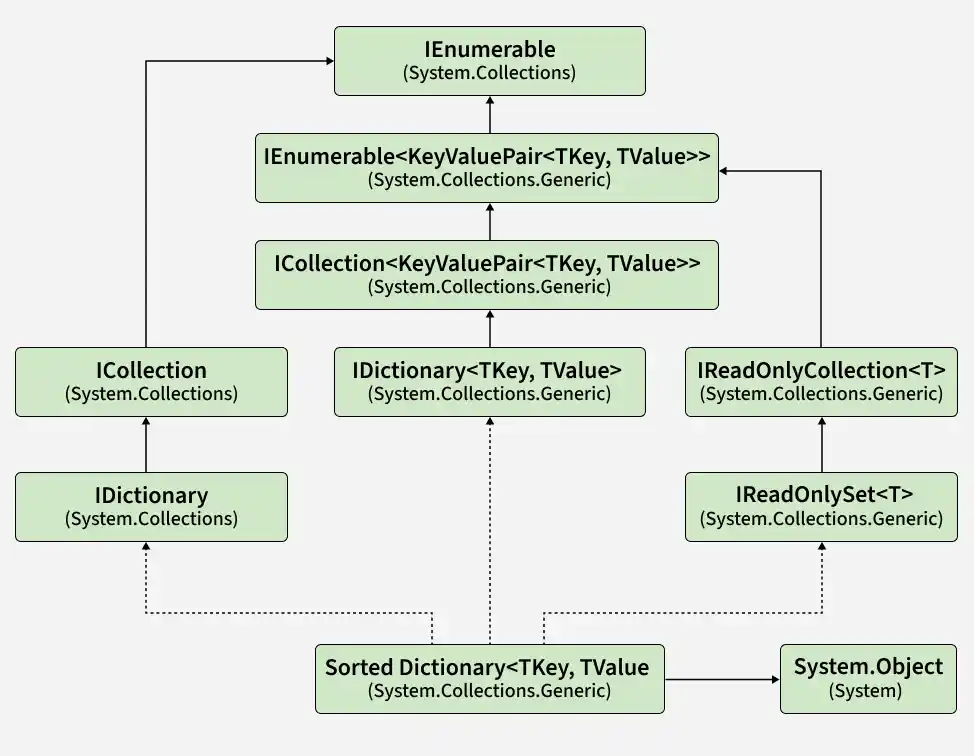
- IDictionary<TKey, TValue>: Provides key-value operations such as adding, removing, and accessing entries.
- IReadOnlyDictionary<TKey, TValue>: Provides read-only access to dictionary entries.
- ICollection<KeyValuePair<TKey, TValue>>: Supports collection-related operations.
- IEnumerable<KeyValuePair<TKey, TValue>>: Enables iteration through entries using foreach.
- IDictionary, ICollection, and IEnumerable: Provide non-generic dictionary, collection, and enumeration functionality.
The implemented interfaces describe supported operations; they are not additional base classes.
Constructors of SortedDictionary<TKey, TValue>
The class provides four constructors for creating an empty dictionary, copying an existing dictionary, or specifying a comparer.
1. SortedDictionary()
Creates an empty dictionary using the default key comparer.
SortedDictionary<int, string> students = new SortedDictionary<int, string>();
For integer keys, the default comparer produces ascending numerical order.
2. SortedDictionary(IComparer<TKey>)
Creates an empty dictionary using the specified key comparer.
SortedDictionary<int, string> students = new SortedDictionary<int, string>
(Comparer<int>.Create((a, b) => b.CompareTo(a)) );
Here, the comparer orders keys in descending order.
3. SortedDictionary(IDictionary<TKey, TValue>)
Copies entries from an existing dictionary and orders them using the default key comparer.
Dictionary<int, string> data = new Dictionary<int, string>{
{ 103, "Rahul" },
{ 101, "Amit" },
{ 102, "Priya" }
};
SortedDictionary<int, string> students = new SortedDictionary<int, string>(data);
Explanation: The new dictionary enumerates keys in the order 101, 102, and 103.
4. SortedDictionary(IDictionary<TKey, TValue>, IComparer<TKey>)
Copies entries from an existing dictionary and uses the specified comparer.
Dictionary<int, string> data = new Dictionary<int, string>{
{ 101, "Amit" },
{ 102, "Priya" },
{ 103, "Rahul" }
};
SortedDictionary<int, string> students = new SortedDictionary<int, string>
(data, Comparer<int>.Create((a, b) => b.CompareTo(a)) );
Note: The comparer determines both key ordering and key uniqueness. If two keys compare as equal, they cannot be stored as separate entries. A copying constructor throws ArgumentException if source keys conflict under the destination comparer.
Performing Different Operations on SortedDictionary<TKey, TValue>
Common operations include adding, accessing, updating, removing, and searching entries while preserving key order.
1. Adding Elements
Use Add() or a collection initializer to insert key-value pairs.
using System;
using System.Collections.Generic;

class Geeks{
    static void Main(){

        // Using Add() method
        SortedDictionary<int, string> students =
            new SortedDictionary<int, string>();

        students.Add(103, "Rahul");
        students.Add(101, "Amit");
        students.Add(102, "Priya");

        Console.WriteLine("Using Add():");
        foreach (var student in students){

            Console.WriteLine($"{student.Key} : {student.Value}");
        }

    }
}
Output
Using Add():
101 : Amit
102 : Priya
103 : Rahul
Explanation:
- SortedDictionary<int, string> creates a dictionary with integer keys and string values.
- The Add() method inserts three student records with keys 103, 101, and 102.
- The dictionary automatically arranges entries in ascending order of their keys.
- The foreach loop iterates through each key-value pair and prints the student ID and name using student.Key and student.Value.
Note: Add() throws ArgumentException if the key already exists. Unlike SortedSet<T>.Add(), it does not return a Boolean indicating whether insertion succeeded.
2. Accessing Elements
Use the indexer to retrieve a value by its key. If the key might be missing, use TryGetValue() to check for it and retrieve its value in one operation.
using System;
using System.Collections.Generic;

class Geeks {
    static void Main()
    {
        SortedDictionary<int, string> students
            = new SortedDictionary<int, string>{
                  { 101, "Amit" }, { 102, "Priya" }
              };

        // Access an existing key
        Console.WriteLine("Student 101: " + students[101]);

        // Safely access a key that may be missing
        if (students.TryGetValue(105, out string name)) {
            Console.WriteLine("Student 105: " + name);
        }
        else {
            Console.WriteLine("Student 105 not found.");
        }
    }
}
Output
Student 101: Amit
Student 105 not found.
Explanation: The indexer retrieves the value associated with key 101. TryGetValue() returns false for key 105, allowing the program to handle the missing entry.
Note: Reading a missing key through the indexer throws KeyNotFoundException. The indexer accepts a key, not a positional index—even when the keys are integers.
3. Updating Elements
Assign a value through the indexer to update an existing entry. If the key does not exist, the assignment inserts a new entry.
using System;
using System.Collections.Generic;

class Geeks {
    static void Main(){

        SortedDictionary<int, string> students
            = new SortedDictionary<int, string>{
                  { 101, "Amit" }, { 102, "Priya" }
              };

        // Update an existing entry
        students[101] = "Neha";

        // Insert a new entry
        students[103] = "Rahul";

        foreach(var student in students)
        {
            Console.WriteLine($"{student.Key} : {student.Value}");
        }
    }
}
Output
101 : Neha
102 : Priya
103 : Rahul
Explanation: The value associated with key 101 changes to "Neha". Key 103 is added because it was not already present.
4. Removing Elements
Use Remove() to delete an entry by key and Clear() to remove all entries.
- Remove(TKey): Returns true if the entry was removed; otherwise, returns false.
- Clear(): Removes every key-value pair.
using System;
using System.Collections.Generic;

class Geeks{
    static void Main(){

        SortedDictionary<int, string> students
            = new SortedDictionary<int, string>{
                  { 101, "Amit" },
                  { 102, "Priya" },
                  { 103, "Rahul" }
              };

        Console.WriteLine("Count before removal: "
                          + students.Count);

        bool removed = students.Remove(102);

        Console.WriteLine("Entry removed: " + removed);
        Console.WriteLine("Count after Remove(): "
                          + students.Count);

        students.Clear();

        Console.WriteLine("Count after Clear(): "
                          + students.Count);
    }
}
Output
Count before removal: 3
Entry removed: True
Count after Remove(): 2
Count after Clear(): 0
5. Checking Whether a Key or Value Exists
Use ContainsKey() to search for a key and ContainsValue() to search for a value.
using System;
using System.Collections.Generic;

class Geeks{
    static void Main(){

        SortedDictionary<int, string> students
            = new SortedDictionary<int, string>{
                  { 101, "Amit" },
                  { 102, "Priya" },
                  { 103, "Rahul" }
              };

        Console.WriteLine("Key 102 exists: "
                          + students.ContainsKey(102));

        Console.WriteLine(
            "Value Priya exists: "
            + students.ContainsValue("Priya"));

        Console.WriteLine("Key 105 exists: "
                          + students.ContainsKey(105));
    }
}
Output
Key 102 exists: True
Value Priya exists: True
Key 105 exists: False
Explanation: The dictionary contains key 102 and value "Priya", but it does not contain key 105.
ContainsKey() uses key-based lookup. ContainsValue() performs a linear search, taking O(n) time, because the collection is sorted by keys rather than values.
6. Iterating Through Elements
Use foreach to visit entries in the order defined by the key comparer. Each entry is a KeyValuePair<TKey, TValue>.
The following example uses a custom comparer to display entries in descending key order.
using System;
using System.Collections.Generic;

class Geeks{
    static void Main(){

        SortedDictionary<int, string> students
            = new SortedDictionary<int, string>(
                Comparer<int>.Create((a, b) => b.CompareTo(a))) {
                  { 102, "Priya" }, { 101, "Amit" },
                  { 103, "Rahul" }
              };

        foreach(
            KeyValuePair<int, string> student in students)
        {
            Console.WriteLine($"{student.Key} : {student.Value}");
        }
    }
}
Output
103 : Rahul
102 : Priya
101 : Amit
Properties of SortedDictionary<TKey, TValue>
The following properties provide access to the dictionary’s size, comparer, keys, and values.
| Property | Description |
|---|---|
| Count | Number of key-value pairs. |
| Comparer | Comparer used to order keys and determine key equivalence. |
| Item[TKey] | Indexer that retrieves, updates, or inserts a value by key. |
| Keys | Collection of keys in dictionary order. |
| Values | Collection of values in the order of their associated keys. |
Example: Display the count, retrieve a value, and enumerate keys and values.
using System;
using System.Collections.Generic;

class Geeks {
    static void Main()
    {
        SortedDictionary<int, string> students
            = new SortedDictionary<int, string>{
                  { 103, "Rahul" },
                  { 101, "Amit" },
                  { 102, "Priya" }
              };

        Console.WriteLine("Count: " + students.Count);
        Console.WriteLine("Student 101: " + students[101]);

        Console.WriteLine(
            "101 comes before 102: "
            + (students.Comparer.Compare(101, 102) < 0));

        Console.WriteLine(
            "Keys: " + string.Join(", ", students.Keys));
        Console.WriteLine(
            "Values: "
            + string.Join(", ", students.Values));
    }
}
Output
Count: 3
Student 101: Amit
101 comes before 102: True
Keys: 101, 102, 103
Values: Amit, Priya, Rahul
Explanation: Comparer.Compare() demonstrates the ordering rule without printing an implementation-specific comparer type name. The values follow their associated keys; they are not sorted independently.
Methods of SortedDictionary<TKey, TValue>
The following table summarizes commonly used methods.
| Method | Description |
|---|---|
| Add(TKey, TValue) | Inserts a key-value pair; throws an exception for a duplicate key. |
| Clear() | Removes all entries. |
| ContainsKey(TKey) | Checks whether a key exists. |
| ContainsValue(TValue) | Checks whether a value exists. |
| CopyTo(KeyValuePair<TKey, TValue>[], int) | Copies entries into an array, starting at the specified array index. |
| GetEnumerator() | Returns an enumerator for visiting entries in key order. |
| Remove(TKey) | Removes an entry by key and reports whether it was removed. |
| TryGetValue(TKey, out TValue) | Retrieves a value if its key exists and reports whether the lookup succeeded. |
