

The BitArray class is a non-generic collection available in the System.Collections namespace. It stores a compact sequence of Boolean values, where true represents 1 and false represents 0.
- Stores Boolean values in a memory-efficient, bit-packed representation.
- Supports bitwise operations such as And(), Or(), Xor(), and Not().
- Allows accessing, modifying, copying, and resizing individual bit values.
Example: Program to demonstrates how to create a BitArray, set individual bit values, and display them.
using System;
using System.Collections;

public class Geeks {
    public static void Main()
    {
        // Create a BitArray
        BitArray bits = new BitArray(4);

        // Set bit values
        bits[0] = true;
        bits[1] = false;
        bits[2] = true;
        bits[3] = false;

        // Display the BitArray
        foreach(bool bit in bits)
        {
            Console.WriteLine(bit);
        }
    }
}
Output
True
False
True
False
Explanation:
- A
BitArrayis created with four elements usingnew BitArray(4). - Individual bit values are accessed and modified using the indexer.
truerepresents a set bit (1), whilefalserepresents an unset bit (0).
Declaration
The BitArray class can be declared by creating an instance of the BitArray class.
Syntax
BitArray bitArrayName = new BitArray(length);
Hierarchy of BitArray
The BitArray class inherits from System.Object and implements interfaces that support collection operations, iteration, and cloning.
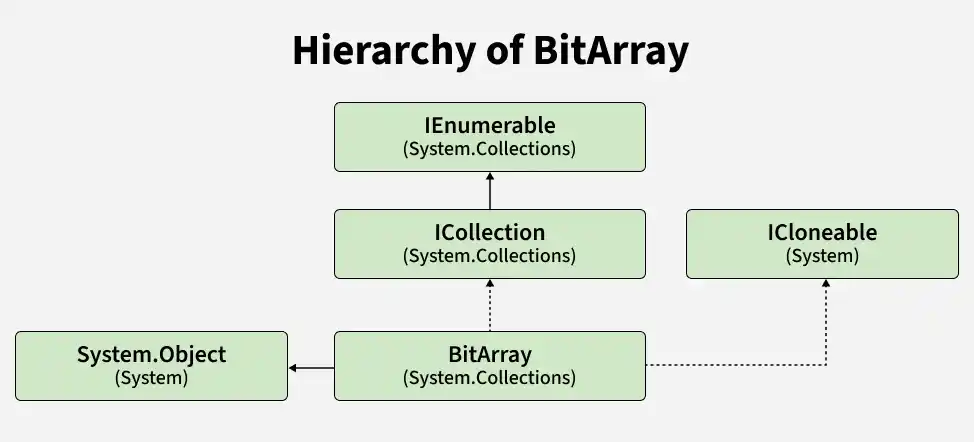
- ICollection: Provides collection-related properties and copying functionality.
- IEnumerable: Supports iteration over bits using foreach.
- ICloneable: Supports creating a copy of the BitArray using Clone().
Constructors of BitArray
The BitArray class provides constructors for creating a bit array with a specified length, initializing it with a Boolean value, or creating it from an existing Boolean array, byte array, integer array, or another BitArray.
1. BitArray(Int32)
Creates a BitArray with the specified number of elements. All elements are initially set to false.
BitArray bits = new BitArray(5);
2. BitArray(Int32, Boolean)
Creates a BitArray with the specified number of elements and initializes all elements to the specified Boolean value.
BitArray bits = new BitArray(5, true);
3. BitArray(Boolean[])
Creates a BitArray from an array of Boolean values.
bool[] values = { true, false, true, false };BitArray bits = new BitArray(values);
4. BitArray(Byte[])
Creates a BitArray from an array of bytes.
byte[] values = { 5, 10 };BitArray bits = new BitArray(values);
5. BitArray(Int32[])
Creates a BitArray from an array of 32-bit integers.
int[] values = { 5, 10 };BitArray bits = new BitArray(values);
6. BitArray(BitArray)
Creates a BitArray containing the same elements as the specified BitArray.
BitArray original = new BitArray(5, true);BitArray copy = new BitArray(original);
Example: Program to demonstrates different ways to initialize a BitArray.
using System;
using System.Collections;

public class Geeks {
    public static void Main()
    {
        // Create a BitArray with specified length
        BitArray bits1 = new BitArray(4);

        // Create a BitArray with all values set to true
        BitArray bits2 = new BitArray(4, true);

        // Create a BitArray from a Boolean array
        bool[] values = { true, false, true, false };
        BitArray bits3 = new BitArray(values);

        // Create a BitArray from another BitArray
        BitArray bits4 = new BitArray(bits3);

        Console.WriteLine("BitArray 1 Count: "
                          + bits1.Count);
        Console.WriteLine("BitArray 2 Count: "
                          + bits2.Count);
        Console.WriteLine("BitArray 3 Count: "
                          + bits3.Count);
        Console.WriteLine("BitArray 4 Count: "
                          + bits4.Count);
    }
}
Output
BitArray 1 Count: 4
BitArray 2 Count: 4
BitArray 3 Count: 4
BitArray 4 Count: 4
Properties of BitArray
The BitArray class provides properties to get information about the number of bits, size, read-only status, synchronization, and individual elements.
| Property | Description |
|---|---|
Count | Gets the number of elements contained in the BitArray. |
Length | Gets or sets the number of elements in the BitArray. |
IsReadOnly | Gets a value indicating whether the BitArray is read-only. |
IsSynchronized | Gets a value indicating whether access to the BitArray is synchronized. |
SyncRoot | Gets an object that can be used to synchronize access to the BitArray. |
Item[Int32] | Gets or sets the value of the bit at the specified index. |
Note: The Count and Length properties both represent the number of accessible bits. However, Length can be modified to resize the BitArray, while Count is read-only.
Example: Program to demonstrates the Count, Length, IsReadOnly, and indexer properties of the BitArray class.
using System;
using System.Collections;

class Geeks {
    public static void Main()
    {
        // Create a BitArray
        BitArray bits = new BitArray(4);

        // Set values
        bits[0] = true;
        bits[1] = false;
        bits[2] = true;
        bits[3] = true;

        Console.WriteLine("Count: " + bits.Count);
        Console.WriteLine("Length: " + bits.Length);
        Console.WriteLine("IsReadOnly: " + bits.IsReadOnly);
        Console.WriteLine("Bit at index 2: " + bits[2]);
    }
}
Output
Count: 4
Length: 4
IsReadOnly: False
Bit at index 2: True
Performing Different Operations on BitArray
The BitArray class supports operations for accessing and modifying individual bits, performing bitwise operations, and resetting bit values.
1. Accessing and Modifying a Bit
The indexer [], Get(), and Set() methods are used to access and modify individual bits. The indexer supports both reading and writing, while Get() retrieves a bit value and Set() updates it.
Example: Program to demonstrates how to access and modify individual bit values.
using System;
using System.Collections;

class Geeks{
    public static void Main(){

        BitArray bits = new BitArray(4);

        // Set values using the indexer
        bits[0] = true;
        bits[1] = false;

        // Set values using Set()
        bits.Set(2, true);
        bits.Set(3, false);

        // Access values
        Console.WriteLine("Bit at index 0: " + bits[0]);
        Console.WriteLine("Bit at index 1: " + bits[1]);
        Console.WriteLine("Bit at index 2: " + bits.Get(2));
        Console.WriteLine("Bit at index 3: " + bits.Get(3));
    }
}
Output
Bit at index 0: True
Bit at index 1: False
Bit at index 2: True
Bit at index 3: False
Explanation: The indexer and Set() method assign Boolean values to specific positions. The indexer and Get() method retrieve those values.
2. Performing Bitwise Operations
The BitArray class provides And(), Or(), Xor(), and Not() methods for performing bitwise logical operations.
- And(): Returns true for a position only when both corresponding bits are true.
- Or(): Returns true when at least one corresponding bit is true.
- Xor(): Returns true when the corresponding bits are different.
- Not(): Inverts each bit from true to false or vice versa.
Example: Program to demonstrates bitwise operations on BitArray objects.
using System;
using System.Collections;

class Geeks{
    public static void Main(){

        BitArray bits1 = new BitArray(
            new bool[] { true, true, false, false });

        BitArray bits2 = new BitArray(
            new bool[] { true, false, true, false });

        BitArray andResult = new BitArray(bits1);
        andResult.And(bits2);

        BitArray orResult = new BitArray(bits1);
        orResult.Or(bits2);

        BitArray xorResult = new BitArray(bits1);
        xorResult.Xor(bits2);

        BitArray notResult = new BitArray(bits1);
        notResult.Not();

        Console.Write("AND: ");
        PrintBits(andResult);

        Console.Write("OR: ");
        PrintBits(orResult);

        Console.Write("XOR: ");
        PrintBits(xorResult);

        Console.Write("NOT: ");
        PrintBits(notResult);
    }

    static void PrintBits(BitArray bits)
    {
        foreach(bool bit in bits)
        {
            Console.Write(bit + " ");
        }

        Console.WriteLine();
    }
}
Output
AND: True False False False
OR: True True True False
XOR: False True True False
NOT: False False True True
Explanation: Each operation is performed on a copy of bits1, preserving the original values.
Note: And(), Or(), and Xor() require BitArrays of equal length. These methods modify the BitArray on which they are called.
3. Setting All Bits to False
The SetAll(false) method resets every bit in a BitArray to false without changing its length. To remove all accessible bits, set the Length property to 0.
Example: Program to demonstrates resetting all bit values.
using System;
using System.Collections;

class Geeks{
    public static void Main(){

        BitArray bits = new BitArray(
            new bool[] { true, true, false, true });

        Console.WriteLine("Before SetAll(false):");

        foreach(bool bit in bits){

            Console.WriteLine(bit);
        }

        bits.SetAll(false);

        Console.WriteLine("After SetAll(false):");

        foreach(bool bit in bits){

            Console.WriteLine(bit);
        }

        Console.WriteLine("Length: " + bits.Length);
    }
}
Output
Before SetAll(false):
True
True
False
True
After SetAll(false):
False
False
False
False
Length: 4
Applications of BitArray
The BitArray class is useful when an application needs to store and manipulate large numbers of Boolean values efficiently.
- Flags and Permissions: Represents enabled or disabled features and permissions.
- Binary Data Processing: Supports bit-level manipulation of binary information.
- Set Representation: Represents membership of values using individual bits.
- Memory-Efficient Storage: Stores large collections of Boolean flags compactly.
Methods of BitArray
The BitArray class provides methods for accessing, modifying, copying, shifting, and performing bitwise operations on Boolean values.
Method | Description |
|---|---|
Performs bitwise AND and modifies the current BitArray. | |
Performs bitwise OR and modifies the current BitArray. | |
Performs bitwise XOR and modifies the current BitArray. | |
Inverts all bits in the current BitArray. | |
Gets the Boolean value at the specified index. | |
Sets the bit at the specified index to the given Boolean value. | |
Sets every bit to the specified Boolean value. | |
Shifts bits left by the specified number of positions. | |
Shifts bits right by the specified number of positions. | |
Creates a copy of the BitArray. | |
Copies bit values into a compatible array. | |
Returns an enumerator for traversing the bits. |
