

The List<T> class is a generic collection available in the System.Collections.Generic namespace. It stores elements in an ordered, dynamically resizable array, allowing developers to add, access, update, and remove elements using their indexes.
- Maintains insertion order and allows duplicate elements.
- Supports zero-based indexing for accessing and modifying elements.
- Automatically increases its internal capacity when needed, without requiring a fixed size.
Example: Program to demonstrates how to create a List<string>, add elements, and iterate through the list using a foreach loop.
using System;
using System.Collections.Generic;

class Geeks{

    static void Main(){

        // Creating a List of strings
        List<string> li = new List<string>();

        // Adding elements
        li.Add("Java");
        li.Add("Python");
        li.Add("DSA");
        li.Add("C++");

        Console.WriteLine("Elements of List are:");

        // Iterating through the list
        foreach (string s in li){
            Console.WriteLine(s);
        }
    }
}
Output
Elements of List are:
Java
Python
DSA
C++
Explanation: The program creates a List<string> and adds four elements using the Add() method. The foreach loop accesses and displays each element in its stored order.
Syntax
List<T> listName = new List<T>();
Here:
- List<T> represents a generic list, where T specifies the element type.
- listName is the variable used to reference the list.
- new List<T>() creates an empty list.
Declaration
The List<T> class is defined in the System.Collections.Generic namespace. Its simplified declaration is:
public class List<T> : IList<T>, IList, IReadOnlyList<T>{
// Implementation
}
It also implements interfaces such as ICollection<T> and IEnumerable<T> through its interface relationships.
Note: Unlike Java, where List is an interface, List<T> in C# is a concrete class that implements multiple collection interfaces.
Hierarchy of List
The List<T> class implements several interfaces that provide functionality for storing, accessing, modifying, and iterating over elements. These interfaces define the common operations supported by different collection types.
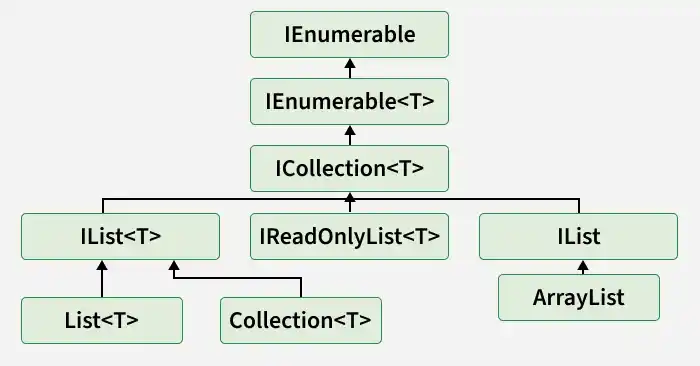
- IEnumerable: A non-generic interface that provides basic iteration functionality.
- IEnumerable<T>: Enables type-safe iteration over a collection using foreach.
- ICollection<T>: Extends IEnumerable<T> and provides operations such as adding, removing, and counting elements.
- IList<T>: Extends ICollection<T> and supports index-based access, insertion, and removal.
- IReadOnlyList<T>: Provides read-only indexed access and extends IReadOnlyCollection<T>, which itself extends IEnumerable<T>.
- IList: A non-generic interface that supports indexed operations and extends the non-generic ICollection interface.
- List<T>: A generic, dynamically resizable collection class implementing IList<T>, IReadOnlyList<T>, IList, and other collection interfaces.
- Collection<T>: A generic collection class that implements IList<T> and can be used as a base for custom collections.
- ArrayList: A legacy, non-generic collection class that implements IList.
Note:The hierarchy diagram has incorrect connections. IReadOnlyList<T> does not inherit from ICollection<T>, non-generic IList has a separate inheritance chain, and List<T>, Collection<T>, and ArrayList are separate classes. The diagram should be corrected before publication.
Operations on List
The List<T> class provides methods and properties for performing operations such as adding, updating, searching, removing, accessing, and checking elements.
1. Adding Elements
Elements can be added to a list using the Add() and Insert() methods.
- Add(item): Adds an element at the end of the list.
- Insert(index, item): Inserts an element at the specified index and shifts subsequent elements to the right.
using System;
using System.Collections.Generic;

class Geeks{

    static void Main(){

        List<string> al = new List<string>();

        al.Add("Geeks");
        al.Add("Geeks");

        // Insert element at index 1
        al.Insert(1, "For");

        Console.WriteLine("[" + string.Join(", ", al) + "]");
    }
}
Output
[Geeks, For, Geeks]
Explanation: The Add() method appends two "Geeks" elements. The Insert(1, "For") method places "For" at index 1, shifting the existing element to the next position.
Note: Insert() accepts an index from 0 through Count. An index outside this range throws ArgumentOutOfRangeException.
2. Updating Elements
To update an element in a list, C# uses the indexer []. The element at the specified index is replaced with the new value.
using System;
using System.Collections.Generic;

class Geeks{

    static void Main(){

        List<string> al = new List<string>();

        al.Add("Geeks");
        al.Add("Geeks");
        al.Add("Geeks");

        Console.WriteLine("Initial List: ["
            + string.Join(", ", al) + "]");

        // Update element at index 1
        al[1] = "For";

        Console.WriteLine("Updated List: ["
            + string.Join(", ", al) + "]");
    }
}
Output
Initial List: [Geeks, Geeks, Geeks]
Updated List: [Geeks, For, Geeks]
Explanation: The statement al[1] = "For" replaces the value at index 1. The number of elements remains unchanged.
3. Removing Elements
The List<T> class supports different methods for removing elements:
- Remove(item): Removes the first occurrence of the specified element.
- RemoveAt(index): Removes the element at the given index.
- Clear(): Removes all elements from the list.
using System;
using System.Collections.Generic;

class Geeks{

    static void Main(){

        List<string> al = new List<string>();

        al.Add("Geeks");
        al.Add("Geeks");
        al.Insert(1, "For");

        Console.WriteLine("Initial List: ["
            + string.Join(", ", al) + "]");

        // Remove by index
        al.RemoveAt(1);

        Console.WriteLine("After Index Removal: ["
            + string.Join(", ", al) + "]");

        // Remove by value
        al.Remove("Geeks");

        Console.WriteLine("After Object Removal: ["
            + string.Join(", ", al) + "]");
    }
}
Output
Initial List: [Geeks, For, Geeks]
After Index Removal: [Geeks, Geeks]
After Object Removal: [Geeks]
Explanation: RemoveAt(1) removes "For" at index 1. The subsequent Remove("Geeks") removes the first matching "Geeks" element, leaving one element.
4. Searching Elements
C# provides the IndexOf() and LastIndexOf() methods to find elements in a list.
- IndexOf(item): Returns the index of the first occurrence.
- LastIndexOf(item): Returns the index of the last occurrence.
Both methods return -1 if the element is not found.
using System;
using System.Collections.Generic;

class Geeks{

    static void Main(){

        List<int> al = new List<int>();

        al.Add(1);
        al.Add(2);
        al.Add(3);
        al.Add(2);

        int first = al.IndexOf(2);
        int last = al.LastIndexOf(2);

        Console.WriteLine(
            "First Occurrence of 2 is at Index: " + first);

        Console.WriteLine(
            "Last Occurrence of 2 is at Index: " + last);
    }
}
Output
First Occurrence of 2 is at Index: 1
Last Occurrence of 2 is at Index: 3
Explanation: The value 2 occurs at indexes 1 and 3. Therefore, IndexOf(2) returns 1, and LastIndexOf(2) returns 3.
5. Accessing Elements
Elements in a C# list are accessed using the indexer [], which returns the element at a specified zero-based index.
using System;
using System.Collections.Generic;

class Geeks{

    static void Main(){

        List<string> al = new List<string>();

        al.Add("Geeks");
        al.Add("For");
        al.Add("Geeks");

        string first = al[0];
        string second = al[1];
        string third = al[2];

        Console.WriteLine(first);
        Console.WriteLine(second);
        Console.WriteLine(third);
    }
}
Output
Geeks
For
Geeks
Explanation: The program accesses the values at indexes 0, 1, and 2. Accessing an invalid index throws ArgumentOutOfRangeException.
6. Checking Whether an Element Exists
The Contains() method checks whether a specified element is present in the list. It returns true if found and false otherwise.
using System;
using System.Collections.Generic;

class Geeks{

    static void Main(){

        List<string> al = new List<string>();

        al.Add("Geeks");
        al.Add("For");
        al.Add("Geeks");

        bool isPresent = al.Contains("Geeks");

        Console.WriteLine("Is Geeks present in the list? "
                          + isPresent);
    }
}
Output
Is Geeks present in the list? True
Explanation: Contains("Geeks") checks the list for the specified value. Since "Geeks" exists, the method returns True.
Iterating Over List
C# provides different ways to traverse a list. Two commonly used approaches are:
- for loop: Accesses elements using their indexes.
- foreach loop: Iterates directly through the stored elements.
using System;
using System.Collections.Generic;

class Geeks{

    static void Main(){
        List<string> al = new List<string>();

        al.Add("Geeks");
        al.Add("Geeks");
        al.Insert(1, "For");

        // Using for loop
        for (int i = 0; i < al.Count; i++){
            Console.Write(al[i] + " ");
        }

        Console.WriteLine();

        // Using foreach loop
        foreach(string str in al){

            Console.Write(str + " ");
        }
    }
}
Output
Geeks For Geeks
Geeks For Geeks
Explanation: The for loop accesses each element using the Count property and indexer, while the foreach loop directly iterates through the elements in stored order.
Methods and Properties of List
The List<T> class provides several useful methods and properties for managing elements.
Method / Property | Description |
|---|---|
Adds an element to the end of the list. | |
Adds multiple elements from another collection. | |
Inserts an element at a specified position. | |
Inserts multiple elements at a specified position. | |
Removes the first matching element. | |
Removes the element at the specified index. | |
Removes elements satisfying a condition. | |
Removes all elements. | |
Returns the number of elements currently stored. | |
Gets or sets the capacity of the internal array. | |
Checks whether an element exists. | |
Returns the index of the first matching element. | |
Returns the index of the last matching element. | |
Find(predicate) | Returns the first matching element, or the default value when none matches. |
Returns a new list containing all matching elements. | |
Checks whether any element satisfies a condition. | |
Sorts the elements. | |
Reverses the element order. | |
ToArray() | Copies the elements into an array. |
Searches a sorted list and returns an index or negative result. |
