

A String is an object used to store a sequence of characters enclosed in double quotes. It belongs to the System namespace and is represented by the String class.
- Strings are immutable, meaning their value cannot be changed after creation
- Provides various methods for manipulating, comparing, searching, and concatenating strings.
Example:
string name = "Geeks";
string num = "1234";

Example: Program to demonstrates how to create a string object using the new keyword and print it.
using System;

class Geeks
{
    static void Main()
    {
        // Creating a string using the new keyword
        string str = new string("Geeks".ToCharArray());

        Console.WriteLine(str);
    }
}
Output
Geeks
Explanation: The program creates a string containing "Geeks" using the new keyword and prints it using Console.WriteLine().
Ways of Creating String
There are two common ways to create a string in C#.
1. String Literal
A string literal is created by assigning a sequence of characters directly to a string variable using double quotes. Identical string literals can share the same interned string object.
Example:
string str = "GeeksforGeeks";
2. Using the new Keyword
Using the new keyword with the String constructor creates a new string object, even if an equivalent string already exists.
- A new string object is created.
- The string value can be identical to an existing interned string, but the new object has a separate identity.
Example:
string str = new string("GeeksforGeeks".ToCharArray());
Immutable String
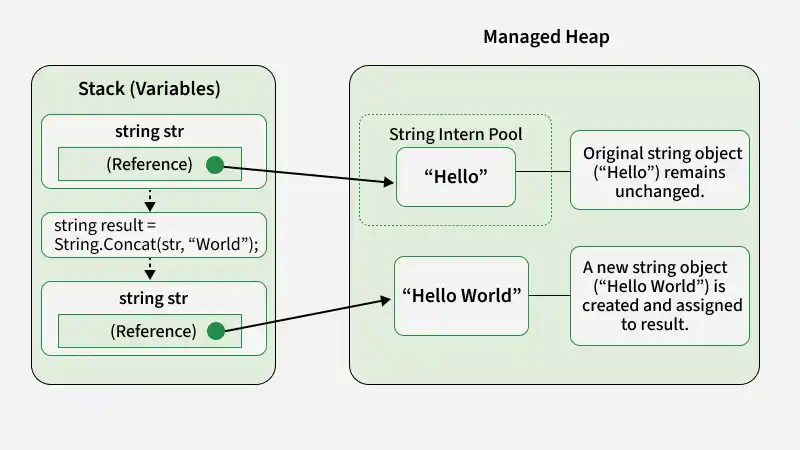
Strings in C# are immutable, meaning the contents of a string object cannot be modified after creation. Operations such as concatenation and replacement return strings containing the resulting text without modifying the original string object.
Example: The following program demonstrates string immutability using the String.Concat() method.
using System;

class GFG
{
    static void Main()
    {
        string str = "Hello";

        string result = string.Concat(str, " World");

        Console.WriteLine(str);
        Console.WriteLine(result);
    }
}
Output
Hello
Hello World
Explanation: The String.Concat() method combines "Hello" and " World" to produce a new string without modifying the original string object.
- The original string "Hello" remains unchanged because strings in C# are immutable.
- A new string "Hello World" is created and assigned to result.
- The variable str continues to reference the original string object.
How Strings Are Stored in Memory
Strings are reference-type objects managed by the .NET runtime and generally allocated on the managed heap. String literals may share interned objects, while strings explicitly constructed using new are separate objects.
1. Memory Allocation Using String Literals
When a string is created using a string literal, the .NET runtime can reuse an interned string object for identical literals. String objects are managed by the .NET runtime and are generally allocated on the managed heap.
Example 1: Creating a string using a string literal.
string str1 = "Hello";
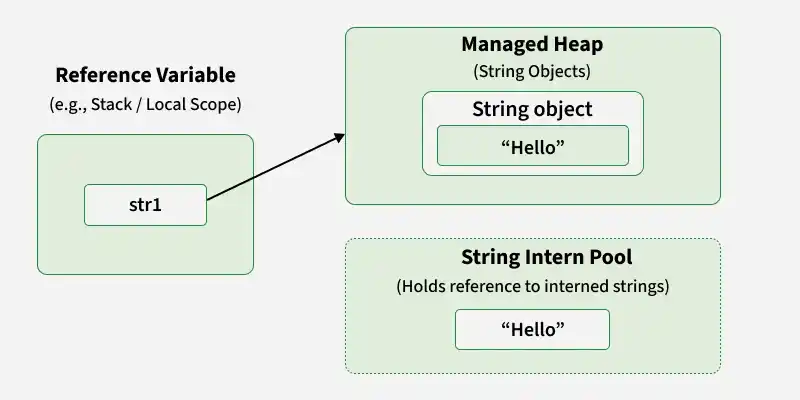
Example 2: Initializing two strings with the same literal.
string str1 = "Hello";
string str2 = "Hello";
Here, both variables can refer to the same interned string object.
2. Memory Allocation Using the new Keyword
Strings can also be created using the new keyword, which creates a new string object. The string value may also exist as an interned string.
Example 1: Using the new keyword to create string objects.
string str1 = new string("John".ToCharArray());
string str2 = new string("Deo".ToCharArray());
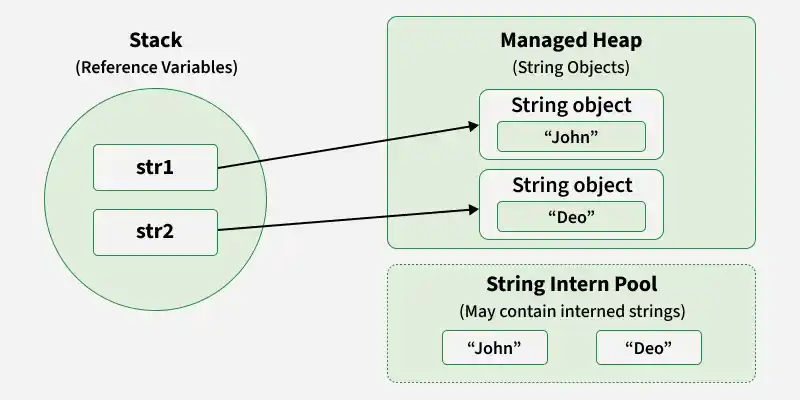
Each statement creates a separate string object containing the specified characters.
The String.Intern() method returns the canonical interned string reference. If an equal string is not already in the intern pool, it is added to the pool; otherwise, the existing interned reference is returned.
Example 2: Using String.Intern() to obtain an interned string reference.
string demoString = new string("Geeks".ToCharArray());

// Get the interned string reference
string internedString = string.Intern(demoString);
When a string is created using a literal, the runtime can reuse an interned string. When new is used, a separate string object is created. The String.Intern() method returns the canonical interned reference for the string value.
String Intern Pool
The string intern pool is a runtime-managed collection of unique string instances. It allows identical string values to share an interned object, helping reduce duplicate string storage.
For example:
string s1 = "Geeks";
string s2 = "Geeks";
Here, both variables can refer to the same interned string object.
Note: Explicitly created strings are not automatically guaranteed to be interned. The intern pool is managed by the .NET runtime.
Let us look at the concept with a C# program.
using System;
class Geeks {
    static void Main()
    { // Declaring strings using literals
        string s1 = "TAT";
        string s2 = "TAT"; // Declaring strings using new
        string s3 = new string("TAT".ToCharArray());
        string s4 = new string("TAT".ToCharArray()); // Printing all strings
        Console.WriteLine(s1);
        Console.WriteLine(s2);
        Console.WriteLine(s3);
        Console.WriteLine(s4);
    }
}
Output
TAT
TAT
TAT
TAT
Explanation: s1 and s2 can refer to the same interned string object. s3 and s4 are explicitly created as separate string objects. All four variables contain the same text, "TAT".
Note: C# string objects are managed by the .NET runtime and are generally allocated on the managed heap. Local reference variables may be stored in stack frames or registers, depending on the execution environment. The exact memory layout is an implementation detail of the runtime.
