

Events allow objects to communicate using the publisher-subscriber model. An event enables one class (publisher) to notify other classes (subscribers) when a specific action occurs, without directly calling their methods.
- Events are based on delegates and declared using the event keyword.
- Multiple subscribers can respond to the same event.
- Commonly used in GUI applications, notifications, and event-driven programming.
Example: Program to demonstrate how an event notifies a subscriber.
using System;

class Publisher{

    public event Action Notify;

    public void SendMessage(){
        Notify?.Invoke();
    }
}

class Geeks{

    static void Main(){

        Publisher publisher = new Publisher();

        publisher.Notify += () =>
            Console.WriteLine("Event received!");

        publisher.SendMessage();
    }
}
Output
Event received!
Explanation: The Notify event is declared using the Action delegate. When SendMessage() is called, the event invokes its subscribed handler and displays the message.
Syntax
public event EventHandler? EventName;
Here:
- event: Keyword used to declare an event.
- EventHandler: Built-in delegate type that defines the handler signature.
- EventName: Name used to subscribe to or unsubscribe from the event.
- ?: Indicates that the event can be null when no handlers are subscribed.
The EventHandler delegate uses the signature:
void Handler(object? sender, EventArgs e){
// Handle the event
}
Working Of Events
Events follow the publisher-subscriber model, where the publisher raises an event and subscribers execute their registered handlers.
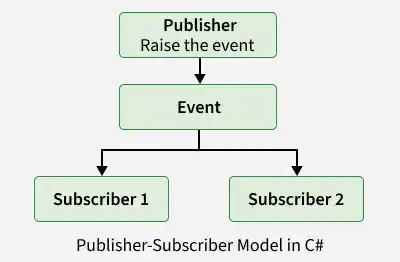
The process involves three steps:
- Declare: The publisher declares an event using a delegate type.
- Subscribe: Subscribers register handler methods using +=.
- Raise: The publisher invokes the event, executing the subscribed handlers.
Subscribers can unregister their handlers using -=.
Event Handlers
An event handler is a method that executes when a specific event is raised, such as a button click or a value change. Event handlers are associated with events using delegates and allow applications to respond to user actions or system events.
Example: Program to demonstrate raises an event when a task is completed.
#nullable enable
using System;

class TaskManager {
    // Declare an event
    public event EventHandler ? TaskCompleted;

    public void RunTask()
    {
        Console.WriteLine("Task Running...");

        // Raise the event
        TaskCompleted ?.Invoke(this, EventArgs.Empty);
    }
}

class Geeks {
    static void Main()
    {
        TaskManager manager = new TaskManager();

        // Subscribe to the event
        manager.TaskCompleted += OnTaskCompleted;

        // Execute the task
        manager.RunTask();
    }

    static void OnTaskCompleted(object? sender, EventArgs e)
    {
        Console.WriteLine("Task Completed!");
    }
}
Output
Task Running...
Task Completed!
Explanation: The TaskManager class declares the TaskCompleted event. When RunTask() executes, it raises the event and invokes the subscribed OnTaskCompleted() handler.
Example 2: Program to demonstrate Event with Custom EventArgs.
#nullable enable
using System;
// Define custom event data
class DownloadEventArgs : EventArgs
{
    public string FileName { get; }

    public DownloadEventArgs(string fileName)
    {
        FileName = fileName;
    }
}

class Downloader
{
    // Declare an event with custom data
    public event EventHandler<DownloadEventArgs>? DownloadCompleted;

    public void Download(string fileName)
    {
        Console.WriteLine("Downloading " + fileName);

        // Raise the event with file information
        DownloadCompleted?.Invoke(
            this, new DownloadEventArgs(fileName));
    }
}

class Geeks
{
    static void Main()
    {
        Downloader downloader = new Downloader();

        // Subscribe to the download event
        downloader.DownloadCompleted += OnDownloadCompleted;

        // Start the download
        downloader.Download("example.txt");
    }

    static void OnDownloadCompleted(
        object? sender, DownloadEventArgs e)
    {
        Console.WriteLine("Download Finished: " + e.FileName);
    }
}
Output
Downloading example.txt
Download Finished: example.txt
Explanation: The DownloadCompleted event passes a DownloadEventArgs object containing the file name. The subscribed handler accesses this information through e.FileName.
Types of built-in delegate
C# provides two commonly used built-in delegate types
- EventHandler: Used when no additional event-specific data is required.
- EventHandler<TEventArgs>: Used when an event needs to pass additional information.
A standard event handler accepts two parameters:
void HandleEvent(object? sender, EventArgs e){
// Handle the event
}
Advantages of Events
- Publishers do not need to know the subscriber implementations.
- Several handlers can respond to one event.
- Prevents external code from directly invoking field-like events.
- New subscribers can be added without modifying the publisher.
Important Points
- Prefer EventHandler and EventHandler<TEventArgs> for standard event patterns.
- Use ?.Invoke() to raise an event safely when subscribers may be absent.
- Unsubscribe using -= when a handler is no longer needed to avoid unwanted notifications and potential memory retention.
- Event handlers execute synchronously by default, and an unhandled exception can interrupt notification of subsequent handlers.
