

C# (pronounced “C-Sharp”) is a modern, object-oriented programming language developed by Microsoft for building web, desktop, cloud, mobile, and enterprise applications. It runs primarily on the .NET platform and provides strong typing, automatic memory management, and a rich set of development libraries.
- Supports object-oriented concepts such as classes, objects, inheritance, encapsulation, and polymorphism.
- Provides cross-platform development through modern .NET.
- Offers type safety, exception handling, and automatic memory management.
Features of C#
C# provides several features that make it suitable for developing reliable, maintainable, and scalable applications.
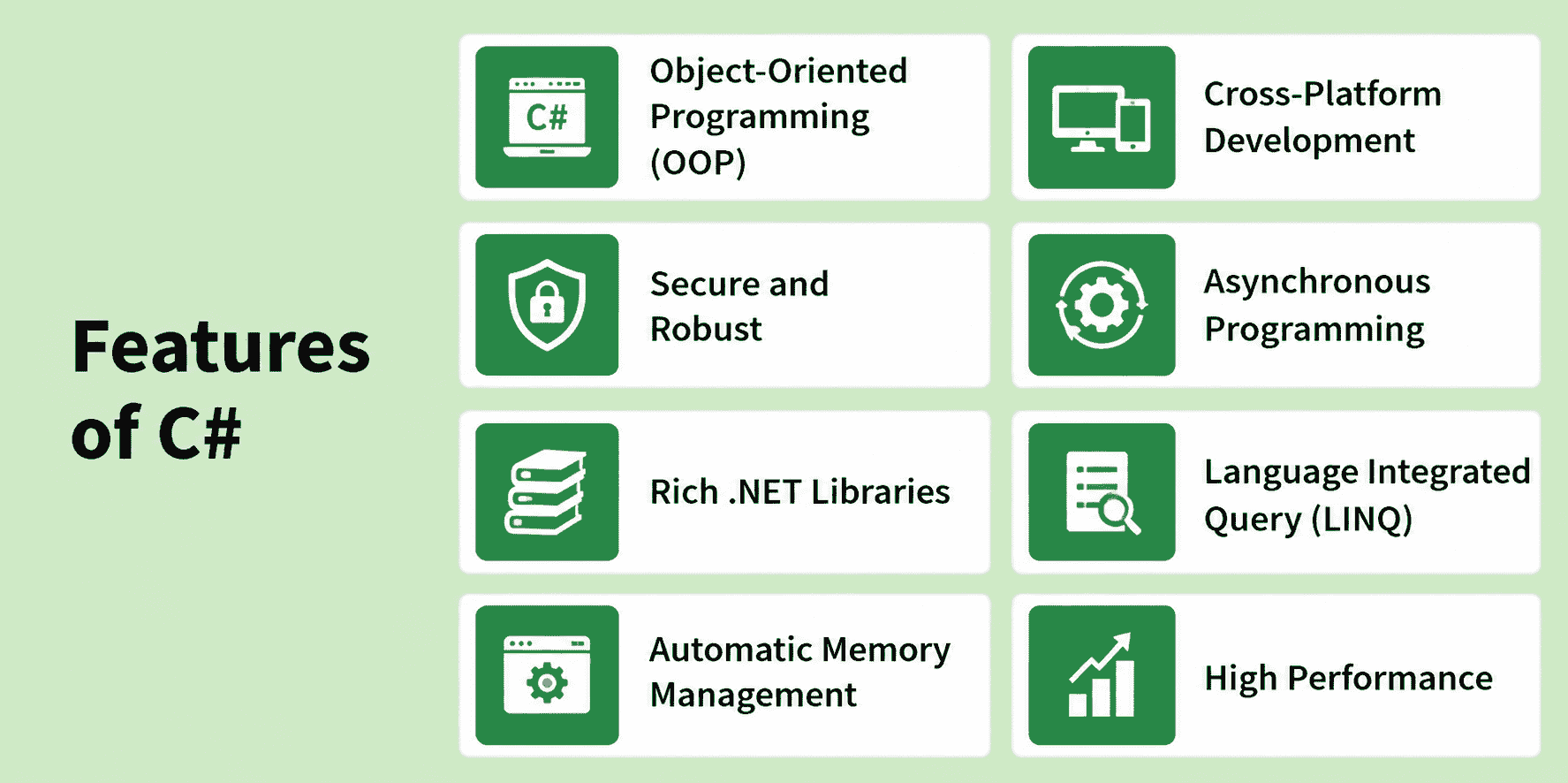
- Object-Oriented Programming: Supports modular and reusable code using classes, objects, inheritance, encapsulation, polymorphism, and abstraction.
- Cross-Platform Development: Modern .NET allows C# applications to run on Windows, Linux, and macOS.
- Strongly Typed: C# performs extensive type checking, helping detect many type-related errors during compilation.
- Automatic Memory Management: The .NET runtime manages memory and automatically reclaims unreachable managed objects through garbage collection.
- Exception Handling: Provides structured exception handling using try, catch, finally, and throw.
- Asynchronous Programming: Supports async and await for writing asynchronous and responsive applications.
- Rich .NET Libraries: Provides APIs for collections, file handling, networking, database access, concurrency, cryptography, and other common development tasks.
- Language Integrated Query (LINQ): Allows developers to query and manipulate collections and other supported data sources using integrated C# syntax and APIs.
- High Performance: Modern .NET uses technologies such as Just-In-Time (JIT) compilation and runtime optimizations to provide efficient application execution.
Understanding Hello World Program
The first program developers usually write while learning C# is the Hello World program. It helps verify that the .NET SDK and development environment are configured correctly while introducing the basic structure of a C# application.
using System;

class GFG{
    static void Main(string[] args)
    {
        Console.WriteLine("Hello, World!");
    }
}
Output
Hello, World!
Structure of C# Program
The structure of a C# program defines how different components are organized to create an executable application.
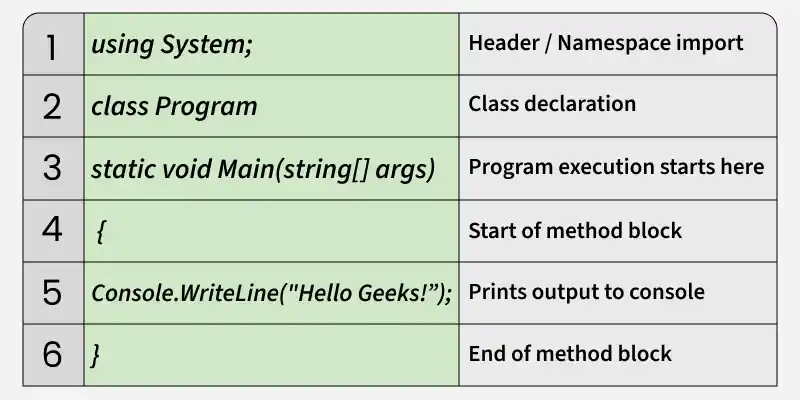
- Namespace Import: using System; imports the System namespace, which provides fundamental classes such as Console class provides methods for standard input and output operations (such as reading from and writing to the console).
- Namespace Declaration: namespace HelloGeeksApp groups related classes together and helps organize code while avoiding naming conflicts.
- Class Declaration: class HelloGeeks defines a class that acts as a container for methods and program logic.
- Main Method: static void Main(string[] args) is the entry point of the C# program where execution begins. static means the method belongs to the class itself, and void indicates that it does not return any value.
- Statement: Console.WriteLine("Hello Geek!"); prints the text "Hello Geek!" to the console using the WriteLine method of the Console class.
- Braces { }: Curly braces define the beginning and end of code blocks such as namespaces, classes, and methods.
How to Run a C# Program?
To create and run a C# application, install the .NET SDK on your system.
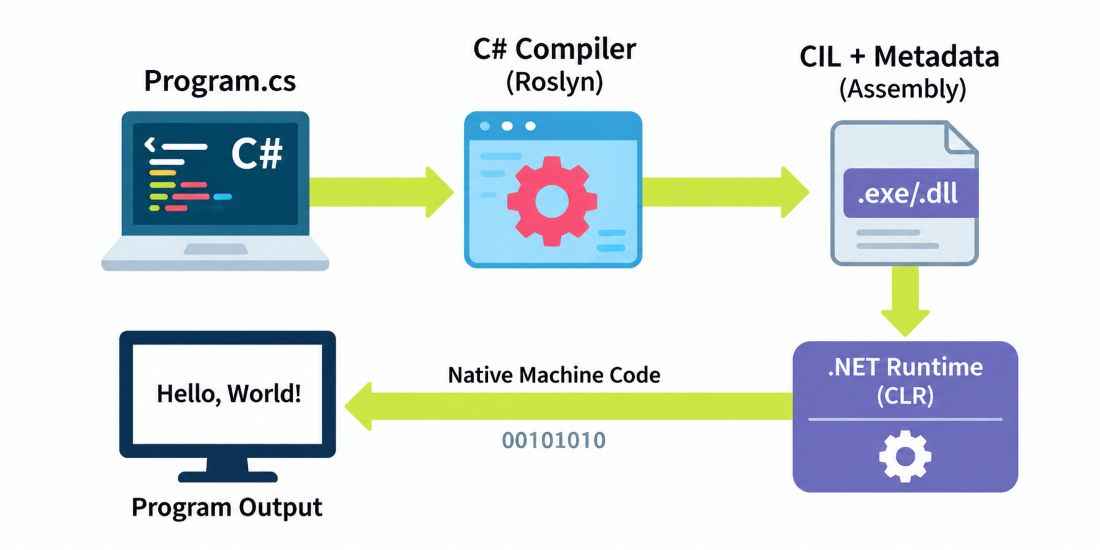
- Write code in a file like Program.cs.
- The C# compiler compiles the source code into Common Intermediate Language (CIL) along with metadata, which is stored in a .NET assembly such as a .dll or .exe.
- The .NET runtime (CLR) loads the assembly and manages the execution of the program.
- The JIT (Just-In-Time) compiler converts CIL into native machine code for the current platform so that it can be executed by the processor.
Famous Applications and Technologies Using C#
C# and .NET are used in various applications, platforms, development tools, and large-scale software systems.
- Unity: C# is the primary scripting language used by developers to implement gameplay logic and application behavior in Unity projects.
- Stack Overflow: Stack Overflow has historically used C# and ASP.NET technologies as important parts of its web application stack.
- Microsoft PowerToys: PowerToys is an open-source collection of Windows utilities containing components developed using C# and other technologies.
- Paint.NET: Paint.NET is an image and photo editing application developed using C# and .NET technologies.
- Microsoft Visual Studio: Visual Studio is built using multiple technologies, with C# and .NET used in parts of its implementation and extensibility ecosystem.
Note: Applications may use multiple programming languages and technologies, and their technology stacks can change over time.
Uses of C#
C# is a general-purpose programming language used across different areas of software development.
- Web Development: C# is used with ASP.NET Core to develop web applications, REST APIs, and backend services.
- Desktop Applications: Technologies such as Windows Forms and WPF allow developers to create Windows desktop applications.
- Game Development: C# is widely used with the Unity game engine to implement game logic and interactive behavior.
- Enterprise Applications: C# and .NET are used to develop business applications, APIs, internal systems, and enterprise services.
- Cloud Applications: C# can be used to develop cloud-native applications, serverless functions, APIs, and distributed services for cloud platforms.
