

Stack<T> is a generic collection that follows the Last In First Out (LIFO) principle, meaning the last element added is the first one removed. It belongs to the System.Collections.Generic namespace and provides efficient operations for adding, removing, and accessing elements.
- Stores elements of a specified type and allows duplicates.
- Dynamically increases its capacity as needed.
- Provides Push(), Pop(), and Peek() for stack operations.
Example: Program to demonstrate how to use Stack to push and pop elements in LIFO order.
using System;
using System.Collections.Generic;

class Geeks{
    static void Main(){

        // Create a stack of integers
        Stack<int> s = new Stack<int>();

        // Push elements onto the stack
        s.Push(1);
        s.Push(2);
        s.Push(3);
        s.Push(4);

        // Pop and display elements
        while (s.Count > 0){
            Console.WriteLine(s.Pop());
        }
    }
}
Output
4
3
2
1
Explanation: The Push() method adds elements to the stack, while Pop() removes and returns the top element. Since a stack follows the LIFO (Last In, First Out) principle, the elements are displayed in reverse order.
Declaration
The Stack<T> class can be declared by specifying the type of elements that the stack will store.
Syntax
Stack<T> stackName = new Stack<T>();
Example
Stack<int> numbers = new Stack<int>();
Here, int specifies that the stack stores integer values.
Hierarchy of Stack Class
The Stack<T> class belongs to the System.Collections.Generic namespace and directly inherits from the System.Object class. It also implements several interfaces that provide collection management and enumeration capabilities.
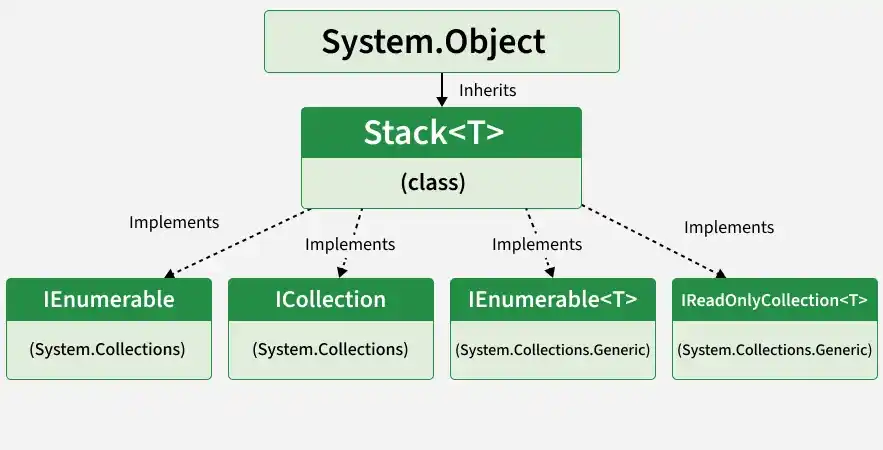
The hierarchy of Stack<T> includes:
- System.Object: The base class from which Stack<T> inherits.
- IEnumerable: Supports iteration over elements using non-generic enumeration.
- ICollection: Provides basic collection functionality, including element counting and copying.
- IEnumerable<T>: Supports type-safe iteration over stack elements.
- IReadOnlyCollection<T>: Provides read-only access to collection information, such as the number of elements.
Constructors of Stack<T> Class
The Stack<T> class provides constructors that can be used to create an empty stack, specify its initial capacity, or initialize it with elements from another collection.
- Stack<T>(): Creates an empty stack.
- Stack<T>(int capacity): Creates an empty stack with a specified initial capacity.
- Stack<T>(IEnumerable<T> collection): Creates a stack using elements from an existing collection.
using System;
using System.Collections.Generic;

class Geeks{

    static void Main(){

        Stack<int> s1 = new Stack<int>();

        Stack<int> s2 = new Stack<int>(5);

        int[] numbers = { 10, 20, 30 };
        Stack<int> s3 = new Stack<int>(numbers);

        Console.WriteLine(s1.Count);
        Console.WriteLine(s2.Count);
        Console.WriteLine(s3.Peek());
    }
}
Output
0
0
30
Performing Different Operations on Stack Class
The Stack<T> class provides several methods to perform operations such as adding, accessing, and removing elements. These operations follow the Last In First Out (LIFO) principle, where the most recently added element is accessed or removed first.
1. Adding Elements
The Push() method adds an element to the top of the stack. Each new element is placed above the previously added elements.
Example: Program to demonstrate the Push() method to add elements to a stack.
using System;
using System.Collections.Generic;

class Geeks {
    public static void Main()
    {
        Stack<string> stack = new Stack<string>();

        // Adding elements
        stack.Push("Geeks");
        stack.Push("For");
        stack.Push("Geeks");

        // Displaying elements
        foreach(string item in stack)
        {
            Console.WriteLine(item);
        }
    }
}
Output
Geeks
For
Geeks
Explanation: The elements are added in the order "Geeks", "For", and "Geeks". Since a stack follows LIFO, enumeration displays the most recently added element first.
2. Accessing the Element
The Peek() method returns the element at the top of the stack without removing it. The number of elements remains unchanged.
Example: Program to demonstrate the Peek() method to access the top element of a stack without removing it.
using System;
using System.Collections.Generic;

class Geeks {
    public static void Main()
    {
        Stack<int> stack = new Stack<int>();

        stack.Push(10);
        stack.Push(20);
        stack.Push(30);

        // Accessing the top element
        Console.WriteLine("Top element: " + stack.Peek());

        // Checking the number of elements
        Console.WriteLine("Count: " + stack.Count);
    }
}
Output
Top element: 30
Count: 3
Explanation: Peek() returns 30 because it is the last inserted element. The stack still contains three elements because Peek() does not remove anything.
3. Removing Elements
The Pop() method removes and returns the top element of the stack. After removal, the next element becomes the new top element.
Example: Program to demonstrate the Pop() method to remove and return the top element from a stack.
using System;
using System.Collections.Generic;

class Geeks {
    public static void Main()
    {
        Stack<int> stack = new Stack<int>();

        stack.Push(10);
        stack.Push(20);
        stack.Push(30);

        // Removing the top element
        Console.WriteLine("Removed: " + stack.Pop());

        // Accessing the new top element
        Console.WriteLine("New top: " + stack.Peek());

        Console.WriteLine("Count: " + stack.Count);
    }
}
Output
Removed: 30
New top: 20
Count: 2
Explanation: Pop() removes 30, which was added last. The next element, 20, becomes the top of the stack, and the count decreases to two.
4. Checking the Number of Elements
The Count property returns the number of elements currently stored in the stack. It can also be used to determine whether the stack is empty.
Example: Program to demonstrate how to count the number of elements in a stack using the Count property.
using System;
using System.Collections.Generic;

class Geeks {
    public static void Main()
    {
        Stack<int> stack = new Stack<int>();

        stack.Push(10);
        stack.Push(20);
        stack.Push(30);

        Console.WriteLine("Total elements: " + stack.Count);

        // Checking whether the stack is empty
        Console.WriteLine("Is empty: "
                          + (stack.Count == 0));
    }
}
Output
Total elements: 3
Is empty: False
Explanation: The Count property returns 3 because the stack contains three elements. The expression stack.Count == 0 returns False because the stack is not empty.
5. Removing All Elements
The Clear() method removes all elements from the stack. After calling this method, the stack becomes empty and its Count becomes zero.
Example: Program to demonstrate the Clear() method to remove all elements from a collection.
using System;
using System.Collections.Generic;

class Geeks {
    public static void Main()
    {
        Stack<int> stack = new Stack<int>();

        stack.Push(10);
        stack.Push(20);
        stack.Push(30);

        Console.WriteLine("Before Clear: " + stack.Count);

        // Removing all elements
        stack.Clear();

        Console.WriteLine("After Clear: " + stack.Count);
    }
}
Output
Before Clear: 3
After Clear: 0
Explanation: Clear() removes all three elements from the stack. The stack remains available for inserting new elements.
Properties of Stack
The Stack<T> class provides properties to retrieve information about the elements and internal storage capacity of the stack.
Property | Description |
|---|---|
Gets the number of elements currently stored in the stack. | |
Gets the number of elements the stack can hold without resizing its internal storage. Available in supported modern .NET versions. |
Capacity is available on modern .NET implementations, but its availability depends on the target framework. For an article covering older frameworks too, focus on Count and explain capacity separately.
Methods in Stack<T> Class
The Stack<T> class in C# provides several methods to add, remove, access, search, and manage elements. The following table lists the commonly used methods of the Stack<T> class in the System.Collections.Generic namespace.
Method | Description |
|---|---|
Adds an element to the top of the stack. | |
Removes and returns the top element of the stack. | |
Returns the top element without removing it. | |
Attempts to remove and return the top element; returns false if the stack is empty. | |
Attempts to access the top element without removing it; returns false if empty. | |
Checks whether the specified element exists in the stack. | |
Removes all elements from the stack. | |
Copies the stack elements into a new array in LIFO order. | |
Copies stack elements into an existing array, starting at the specified index. | |
Returns an enumerator to iterate through stack elements. | |
Reduces the internal capacity when excess storage is no longer needed. | |
Ensures the stack has at least the specified capacity on supported .NET versions. |
Note: The table focuses on methods applicable to the generic Stack<T> class. Methods such as Clone() and Synchronized() belong to the non-generic Stack class and should not be included here.
